# Business Units and Associates overview
**Overview of the concepts related to Associates, Associate Roles, and Permissions.**
An [Associate](/api/business-units-and-associates-overview.md#associate) is a [Customer](/api/projects/customers.md) acting on behalf of a company. Business Units allow you to model companies in hierarchical structures and define which Associates can represent a company. Each Associate in a Business Unit has a specific set of [roles](/api/business-units-and-associates-overview.md#associate-role) that determines the [Permissions](/api/business-units-and-associates-overview.md#permission) they have.
Learn more about modeling Customers, Associates, roles, and permission inheritance in our self-paced [Configure associate access](/learning-model-b2b-commerce/configure-associate-access/overview.md) module.
## Definitions
#### Seller
In a B2B context, a Seller is a merchant offering goods and services to companies.
#### Buyer
A Buyer is a company or a representative of the company purchasing goods and services from a [Seller](/api/business-units-and-associates-overview.md#seller). They are represented by [Associates](/api/projects/business-units.md#associate) in [Business Units](/api/projects/business-units.md#businessunit).
#### Business Unit
A Business Unit represents a [Buyers](/api/business-units-and-associates-overview.md#buyer) organization. It can be used to model companies in hierarchical structures and determine which [Associates](/api/projects/business-units.md#associate) can act on behalf of the company.
#### Associate
An Associate is a Customer who represents a company. They have specific roles that determine their permissions to access and perform actions, like creating carts or placing orders.
#### Associate Role
An [Associate Role](/api/projects/associate-roles.md#associaterole) is created and managed by [Sellers](/api/business-units-and-associates-overview.md#seller) and defines the granular [Permissions](/api/business-units-and-associates-overview.md#permission) associated with each role. It is assigned to an Associate in a Business Unit. Associates and their roles can be inherited within the hierarchy of Business Units.
#### B2B resources
Carts, Orders, Recurring Orders, Quotes, Quote Requests, and Shopping Lists that exist within the context of a Business Unit. For how B2B resources reference a Business Unit in the API, see [Business Units and Associates APIs overview](/api/business-units-and-associates-apis-overview.md#b2b-resources).
#### Permission
[Permissions](/api/projects/associate-roles.md#permission) provide controlled access to [B2B resources](/api/business-units-and-associates-overview.md#b2b-resources). For how Permissions are named in the API, see [Business Units and Associates APIs overview](/api/business-units-and-associates-apis-overview.md#permission-naming-convention).
#### Inheritance
Inheritance refers to the process by which [Associates](/api/projects/business-units.md#associate) and their roles are passed down within the hierarchy of Business Units.
#### Approval Rule
An [Approval Rule](/api/projects/approval-rules.md#approvalrule) outlines the conditions under which an Order that matches a [predicate](/api/predicates/predicate-operators.md) needs approval from an approver before it can be ordered by a requester within a [Business Unit](/api/business-units-and-associates-overview.md#business-unit).
#### Approval Flow
An Approval Flow matches [Approval Rules](/api/business-units-and-associates-overview.md#approval-rule) to [Orders](/api/projects/orders.md#order) and manages the approval state. This includes information about whether the Order is approved or not and the approval status of each approver.
#### Buyer portal
A Buyer portal is a frontend interface hosted and implemented by the [Seller](/api/business-units-and-associates-overview.md#seller). It is used by the [Associates](/api/business-units-and-associates-overview.md#associate) of a [Buyer](/api/business-units-and-associates-overview.md#buyer) company to manage their [B2B resources](/api/business-units-and-associates-overview.md#b2b-resources), [Permissions](/api/business-units-and-associates-overview.md#permission), and [Approval Rules](/api/business-units-and-associates-overview.md#approval-rule).
```mermaid
graph TD
subgraph commercetools commerce API platform
coco{commercetools commerce
APIs}
end
subgraph Seller company
portal{Buyer portal
frontend + backend}
end
subgraph Buyer company
associate{{Associate}}
end
associate--uses Buyer portal via web browser
to use B2B features like Buyer Approval Flow-->portal
portal--uses commercetools commerce API on behalf of the Associate-->coco
```
## Hierarchies within Business Units
[Business Units](/api/projects/business-units.md) allow you to create and manage representations of businesses in your Project. They are especially useful in B2B use cases because they allow you to represent a company's structure and the access rights of its members.
As illustrated in the diagram below, Business Units are organized hierarchically in tree structures, with a single Business Unit on top. The top-level Business Unit must be of type Company. Units that are organized below are of type Division. Divisions contain a reference to their parent Company or to a higher-order Division.
```mermaid
graph BT;
B(Division) --> A[Company];
C(Division) --> A;
D(Division) --> A;
E(Division) --> C;
```
## Associate Roles and Permissions
Each Associate Role includes a set of Permissions that provide controlled access to [B2B resources](/api/business-units-and-associates-overview.md#b2b-resources). For how roles are assigned to Associates in the API, see [Business Units and Associates APIs overview](/api/business-units-and-associates-apis-overview.md#associate-roles-and-permissions).
The following diagram shows three example Associate Roles, each with a set of Permissions.
```mermaid
graph LR
A[Buyer Role] --> B(ViewMyCarts)
A --> C(CreateMyCarts)
G[Supervisor Role] --> H(ViewOthersCarts)
G --> I(CreateOrdersFromOthersQuotes)
D[Business Admin Role] --> E(UpdateBusinessUnitDetails)
D --> F(AddChildUnits)
D --> J(UpdateAssociates)
style A fill:#eeeee4
style D fill:#eeeee4
style G fill:#eeeee4
```
### Roles in Business Units
You can define the different roles that [Associates](/api/business-units-and-associates-overview.md#associate) can hold in a Business Unit. These roles can allow Associates to manage the Business Unit, manage other Associates, and to make purchases on behalf of the Business Unit.
### Sellers' Role in Managing Permissions
[Sellers](/api/business-units-and-associates-overview.md#seller) create and manage Associate Roles, including defining the granular Permissions associated with each role. For how to make roles assignable by Buyers with the API, see [Business Units and Associates APIs overview](/api/business-units-and-associates-apis-overview.md#associate-roles-and-permissions).
## Inheritance of Associates and their roles
Associates and their roles can be inherited within the [hierarchy of Business Units](/api/business-units-and-associates-overview.md#hierarchies-within-business-units). For how inheritance is configured in the API, see [Business Units and Associates APIs overview](/api/business-units-and-associates-apis-overview.md#inheritance-of-associates-and-their-roles).
Divisions can support inheritance, which allows them to inherit Stores, Approval Rules, and Associates with their roles from parent units higher up in the hierarchy.
### Accumulative permissions of inherited roles
The [Permissions](/api/projects/associate-roles.md#permission) of an Associate are the sum of all permissions included on the Associate Role assigned to the Associate directly, and those from inherited roles. The following example demonstrates how permissions accumulate.
```mermaid
flowchart LR
classDef default fill:#e6f5fe,stroke:#078cdf,stroke-width:1px,color:#000000;
classDef group fill:#e6f5fe,stroke-width:0px;
subgraph Associate[Associate in a Business Unit]
direction LR
subgraph Inherited[Inherited Roles]
direction LR
Role1 --> ViewMyCarts([ViewMyCarts])
Role1 --> ViewOthersCarts([ViewOthersCarts])
direction LR
Role2 --> ViewMyOrders([ViewMyOrders])
Role2 --> ViewOthersOrders([ViewOthersOrders])
end
subgraph Explicit[Explicit Roles]
direction LR
Role3 --> ViewMyQuotes([ViewMyQuotes])
Role3 --> ViewOthersQuotes([ViewOthersQuotes])
end
subgraph AssociatePermissions[Resulting permissions]
note(Role1 + Role2 + Role3)
direction LR
subgraph ViewCarts[ ]
direction TB
ViewMyCartsR([ViewMyCarts])
ViewOthersCartsR([ViewOthersCarts])
end
subgraph ViewOrders[ ]
ViewMyOrdersR([ViewMyOrders])
ViewOthersOrdersR([ViewOthersOrders])
end
subgraph ViewQuotes[ ]
ViewMyQuotesR([ViewMyQuotes])
ViewOthersQuotesR([ViewOthersQuotes])
end
end
end
Inherited -.-> AssociatePermissions
Explicit -.-> AssociatePermissions
style AssociatePermissions stroke-dasharray: 5 5
class ViewCarts,ViewOrders,ViewQuotes group
```
## Buyer Approval Flows
Buyer Approval Flows provide a flexible [Order](/api/projects/orders.md) approval process for [Business Units](/api/business-units-and-associates-overview.md#business-unit). They define conditions that necessitate the requirement for an Order to be approved. This mechanism is useful especially when structuring multi-tiered approval processes for B2B ordering processes.
[Approval Flows](/api/business-units-and-associates-overview.md#approval-flow) are linked to Orders and are initiated by matching [Approval Rules](/api/business-units-and-associates-overview.md#approval-rule). The Approval Rule encapsulates the conditions an Order must meet to qualify for the rule's approval process. Approval Rules consist of one or more levels, that are referred to as tiers within an [approver hierarchy](/api/projects/approval-rules.md#approverhierarchy). Each tier encapsulates one or more [Associate Roles](/api/business-units-and-associates-overview.md#associate-role) that must authorize the Order before it advances to the subsequent tier.
For how to work with Approval Rules and Approval Flows in the API, see [Business Units and Associates APIs overview](/api/business-units-and-associates-apis-overview.md#buyer-approval-flows).
### Intended workflow
Approval Flows represent the [Order](/api/projects/orders.md) approval process. For Approval Flows to come into effect, Buyers are required to [configure Approval Rules](/api/business-units-and-associates-overview.md#configure-approval-rules) as per their organizational requirements.
The following steps describe the intended workflow, alongside a corresponding diagram:
1. A Requester creates a new Order.
2. The platform checks whether any Approval Rules match the Order.
1. **If the Order matches one or more Approval Rules:**
1. A new Approval Flow is initiated in a pending state to track the approval process.
2. Approvers provide their approvals or rejections, conforming to the specified tier hierarchy.
3. If all required Approvers provide approval, the Approval Flow's status changes to approved.
4. If any rejections occur, the Approval Flow's status changes to rejected.
2. **If the Order doesn't match any Approval Rules, it bypasses the approval process.**
> When an Approval Flow's status changes to approved or rejected, it signifies the completion of the approval process.
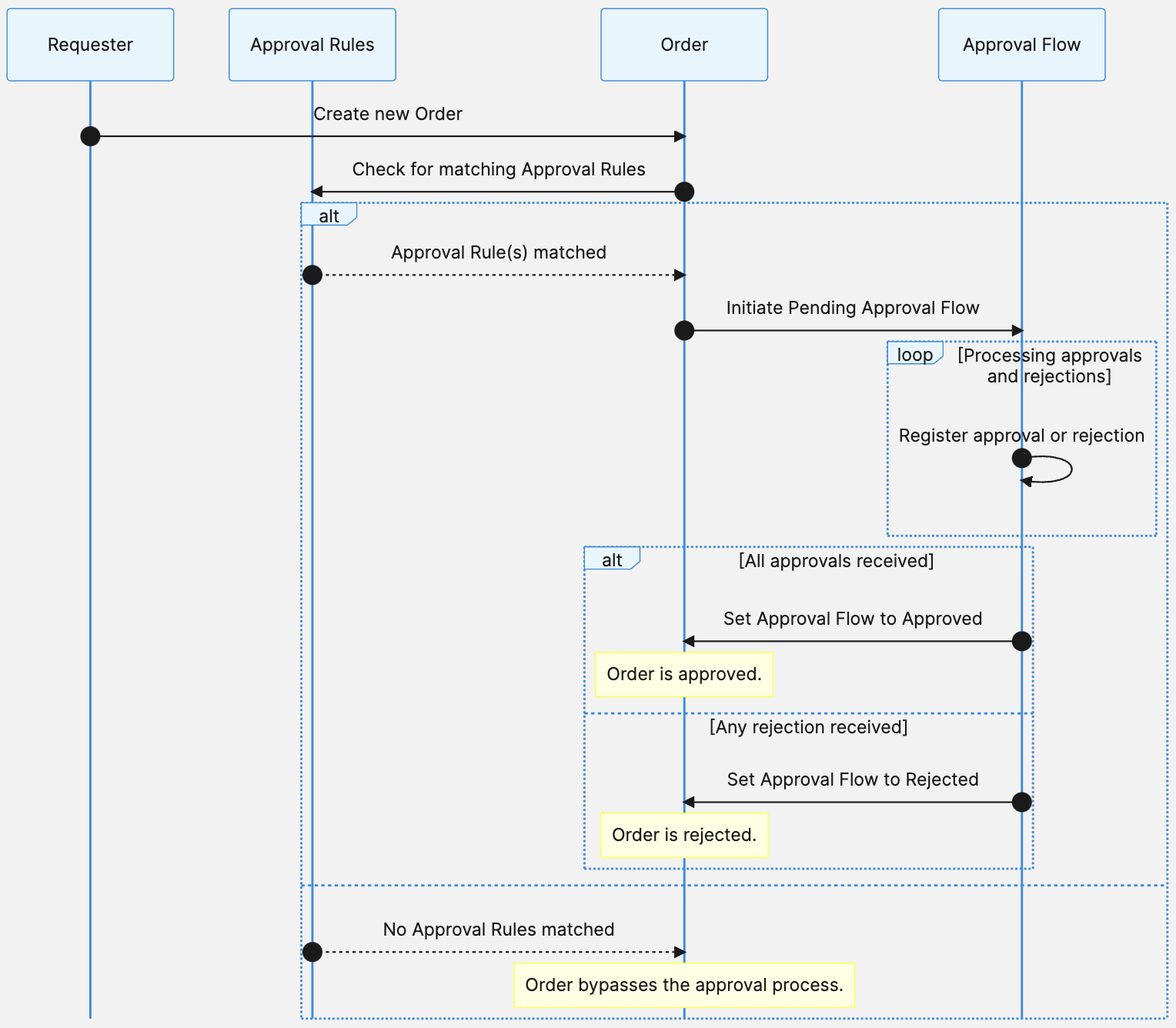
An Approval Flow, along with its corresponding Order, achieves full approval once all necessary approvers, as per individual [rule approver hierarchies](/api/business-units-and-associates-overview.md#buyer-approval-flows), from all its Approval Rules, give their approval. However, a single instance of rejection will lead to the rejection of the entire Approval Flow.
### Configure Approval Rules
[Approval Rules](/api/business-units-and-associates-overview.md#approval-rule) provide a flexible approach to defining approval requirements for [Orders](/api/projects/orders.md) using boolean logic. Approvers are designated by [Associate Roles](/api/business-units-and-associates-overview.md#associate-role), preventing the need to bind Approval Rules to specific individuals.
The configuration supports multiple tiers of approver expressions, allowing for the next level of approvers to be notified only when the preceding level has approved the Order. To streamline the approval process, higher-level approvers also have the option to approve an Order before they receive a notification. This early approval automatically approves all lower levels.
For how approver hierarchies are structured in the API, see [Business Units and Associates APIs overview](/api/business-units-and-associates-apis-overview.md#approver-hierarchy). For the limits that apply to Approval Rules, see [Business Units and Associates APIs overview](/api/business-units-and-associates-apis-overview.md#limits). For worked examples of approver hierarchies, see [Approval Rules](/api/projects/approval-rules.md#example-configuration-of-an-approval-rule).
Each tier combines approvers with conditions that use the logical operators `OR` and `AND`. In an OR condition, if any of the conditions is true, the whole expression is true. Applied to the approval process, an OR condition represents a scenario where any one of a set of approvers can approve an Order for it to pass.
In an AND condition, all conditions must be true for the whole expression to be true. For the approval process, an AND condition means that all specified approvers must approve an Order for it to pass.
```mermaid
flowchart
subgraph tier1[Tier 1]
direction TB
and11[AND]
or11[OR]
or12[OR]
or11 --> role11[Associate A]
or11 --> role12[Associate B]
or12 --> role14[Associate C]
and11 --> or11
and11 --> or12
end
```
You can explicitly set Approval Rules on individual Business Units. Approval Rules can also be inherited, meaning rules set on a Business Unit can be applied to other units lower in the hierarchy.
## Lifecycle and states
### Business Unit status
> Deactivating a Business Unit does not affect inheritance; child units remain active and continue to inherit role assignments even if the parent unit is inactive.
>
> Inactive Business Units cannot be associated with new Carts, Orders, Quote Requests, or Quotes.
## Company-specific products, prices, and discounts
For any Cart and Order, the platform sets the [Product Selection](/api/projects/product-selections.md) and Prices based on the Business Unit of the Cart. The [Store](/api/projects/stores.md) of the Customer is disregarded in this instance. Therefore it is important to model company-specific products or pricing at the Business Unit level.
Typical B2B scenarios require specifying bespoke prices for each Business Unit individually. To help support this, there are other pricing dimensions in addition to Customer Groups. Stores give you more flexibility in customer-specific price models since you are able to assign [Channels](/api/project-configuration-overview.md#channel) and [Product Selections](/api/projects/product-selections.md) to a Business Unit.
The following table summarizes which resources you can utilize for which purpose in your use case.
| Resource | Use it for |
| --- | --- |
| [Cart Discounts](/api/projects/cartDiscounts.md) | specifying the customer-specific cart discount on each Cart object |
| [Channels](/api/projects/channels.md) | specifying the customer-specific price on each Price object |
| [Stores](/api/projects/stores.md) | specifying the customer-specific distribution channel used on each Price object, scoping the permission to the particular Customer |
| [Product Selections](/api/projects/product-selections.md) | specifying a customer-specific assortment of Products. B2B companies frequently have restrictions on which subset of their products they can make available to customers due to, for instance, purchase regions or legal restrictions. Not needed if all Products should be available for all Customers |
| [Business Units](/api/projects/business-units.md) | letting companies act as customers |
The following steps provide a high-level approach to setting up company-specific products, prices, and discounts. The steps can vary depending on your Project model.
1. Create a Channel to represent a specific set of Prices.
2. Create a Product and assign it a different Price inside the new Channel.
3. Create a Product Selection and add the Product to it.
4. Create a Store and assign the Channel and Product Selection to it.
5. Assign the Store to the Business Unit that represents the customer.
6. Create a Cart Discount in the Store.
7. Create a Cart in the Store and add the Product.
8. Place an Order for the customer.
It may be that multiple divisions of the same company get the same negotiated prices, but their [Orders](/api/projects/orders.md) need to be separate for administrative purposes. In this case, you can create the Divisions as child [Business Units](/api/projects/business-units.md) of the same Company with their own individual buyers. A single Store can be referenced on all Divisions of the Company.
Depending on your use case, you may not need Stores at all. You can use Channels only. If you want to use Product Selections, you must use them together with Stores.
Depending on how many different prices you want to represent, you may choose to use Standalone Prices instead of Embedded Prices. For more information about the difference between Embedded Prices and Standalone Prices, see [Pricing](/api/pricing-and-discounts-overview.md#pricing).
To handle volume-based pricing, we recommend creating a [Store](/api/projects/stores.md) and [Channel](/api/projects/channels.md) per price band. Then add the appropriate price to each Channel for each Product you want to sell. Assigning a price-band-specific Store to a [Business Unit](/api/projects/business-units.md) gives that Business Unit access to the correct pricing.
For the API rules that apply when you set up customer-specific prices for Business Units, see [Business Units and Associates APIs overview](/api/business-units-and-associates-apis-overview.md#customer-specific-prices).
## Business Unit Search
Business Unit Search enables merchants to search across a large number of Business Units in a Project, supporting back-office use cases. In addition to the Merchant Center, Business Unit Search also lets you search for Business Units in other back-office applications. It is not intended for searching through Business Units in a storefront.
For how to work with Business Units, Associates, Associate Roles, and Approval Rules with the API, see [Business Units and Associates APIs overview](/api/business-units-and-associates-apis-overview.md).
## Related pages
- [Area overview page with navigation](/api.md)
- [Next page: APIs overview](/api/business-units-and-associates-apis-overview.md)
- [Search documentation and API specs](/search.md)