# Get started with the Java SDK
Learn how to set up and use the Java SDK.
This step-by-step guide leads you through setting up and making API calls using the Java SDK.
For a guided hands-on tutorial, see [Set up the Java SDK](/learning-composable-commerce-developer-essentials/prepare-your-work-environment/set-up-the-java-sdk.md) in the Developer Essentials learning path.
## Requirements
To follow this guide you should have the following:
- A commercetools Project
- An [API Client](/api/projects/api-clients.md)
- Java 8 (or later)
For more information on setting up a commercetools Project or API Client, follow our [Getting started with commercetools](/api/getting-started/initial-setup.md) guides.
## Objectives of the get started guide
After following this guide you will have:
- [Installed the Java SDK](/dev-tooling/java-sdk-getting-started.md#install-the-java-sdk)
- [Created a Client class](/dev-tooling/java-sdk-getting-started.md#create-the-client-class)
- [Tested your Client](/dev-tooling/java-sdk-getting-started.md#test-the-client)
- [Learned how to make API calls with the Java SDK](/dev-tooling/java-sdk-getting-started.md#structure-your-api-call)
## Placeholder values
Example code in this guide uses the following placeholder values. You should replace these placeholders with the following values.
If you do not have an API Client, follow our [Get your API Client](/api/getting-started/create-api-client.md) guide.
| Placeholder | Replace with | From |
| --- | --- | --- |
| `{projectKey}` | project\_key | your API Client |
| `{clientID}` | client\_id | your API Client |
| `{clientSecret}` | secret | your API Client |
| `{scope}` | scope | your API Client |
| `{region}` | your Region | [Hosts](/api/general-concepts.md#hosts) |
## Install the Java SDK
### Gradle
Add the following to your `build.gradle` file.
The following example installs the latest version of each dependency. To use a specific version, replace `latest.release` with the version number.
```groovy title="Add the Java SDK to your Gradle project"
ext {
versions = [
commercetools: "latest.release"
]
}
repositories {
mavenCentral()
}
dependencies {
implementation "com.commercetools.sdk:commercetools-http-client:${versions.commercetools}"
implementation "com.commercetools.sdk:commercetools-sdk-java-api:${versions.commercetools}"
}
```
To access the [Import API](/api/import-export/overview.md), [Audit Log API](/api/history/overview.md), or [Checkout API](/checkout), include the respective dependency:
```groovy
implementation "com.commercetools.sdk:commercetools-sdk-java-importapi:${versions.commercetools}"
```
```groovy
implementation "com.commercetools.sdk:commercetools-sdk-java-history:${versions.commercetools}"
```
```groovy
implementation "com.commercetools.sdk:commercetools-sdk-java-checkout:${versions.commercetools}"
```
### Maven
Add the following to your `pom.xml` file.
The following example installs the latest version of each dependency. To use a specific version, replace `LATEST` with the version number.
```xml title="Add the Java SDK to your Maven project"
LATEST
com.commercetools.sdk
commercetools-http-client
${commercetools.version}
com.commercetools.sdk
commercetools-sdk-java-api
${commercetools.version}
```
To access the [Import API](/api/import-export/overview.md), [Audit Log API](/api/history/overview.md), or [Checkout API](/checkout), include the respective dependency:
```xml
com.commercetools.sdk
commercetools-sdk-java-importapi
${commercetools.version}
```
```xml
com.commercetools.sdk
commercetools-sdk-java-history
${commercetools.version}
```
```xml
com.commercetools.sdk
commercetools-sdk-java-checkout
${commercetools.version}
```
### Maven Central
You can find a full list of commercetools SDKs and the latest versions at [Maven Central Repository Search](https://central.sonatype.com/namespace/com.commercetools.sdk).
For any SDK module, you must install an HTTP client module. The default HTTP client module is `commercetools-http-client`.
### HTTP client modules
The following HTTP client modules are available. Choose based on your environment and dependencies:
| Module | Underlying client |
| --- | --- |
| `commercetools-http-client` | Alias for `commercetools-async-http-client` (default) |
| `commercetools-async-http-client` | Async HTTP client 2.12 |
| `commercetools-okhttp-client4` | OkHttp 4.0 |
| `commercetools-okhttp-client3` | OkHttp 3.0 |
| `commercetools-apachehttp-client` | Apache HTTP async client 5.1 |
| `commercetools-reactornetty-client` | Reactor Netty HTTP client |
| `commercetools-javanet-client` | `java.net.http.HttpClient` (JDK 11+) |
### Troubleshoot with the Spring Framework
The Spring Framework has an optional dependency to OkHttp in version 3.x.
To avoid problems use the `commercetools-okhttp-client3` or `commercetools-apachehttp-client` module instead of the module `commercetools-http-client`.
## Create the Client class
Create a class called `Client` and add the following code:
```java
// Package declaration
// Required imports
import com.commercetools.api.client.ProjectApiRoot;
import com.commercetools.api.defaultconfig.ApiRootBuilder;
import com.commercetools.api.defaultconfig.ServiceRegion;
import io.vrap.rmf.base.client.oauth2.ClientCredentials;
public class HTTPApiClient {
public static ProjectApiRoot createApiClient() {
final ProjectApiRoot httpApiRoot = ApiRootBuilder.of()
.defaultClient(ClientCredentials.of()
.withClientId("{clientID}")
.withClientSecret("{clientSecret}")
.build(),
ServiceRegion.GCP_EUROPE_WEST1)
.build("{projectKey}");
return httpApiRoot;
}
}
```
Change `ServiceRegion.GCP_EUROPE_WEST1` to match the [Region](/api/general-concepts.md#regions) where your Project is hosted. For more information about the supported values, see [ServiceRegion](https://commercetools.github.io/commercetools-sdk-java-v2/javadoc/com/commercetools/api/defaultconfig/ServiceRegion.html).
```java
// Package declaration
// Required imports
import com.commercetools.importapi.client.ProjectApiRoot;
import com.commercetools.importapi.defaultconfig.ImportApiRootBuilder;
import com.commercetools.importapi.defaultconfig.ServiceRegion;
import io.vrap.rmf.base.client.oauth2.ClientCredentials;
public class ImportApiClient {
public static ProjectApiRoot createApiClient() {
final ProjectApiRoot importApiRoot = ImportApiRootBuilder.of()
.defaultClient(ClientCredentials.of()
.withClientId("{clientID}")
.withClientSecret("{clientSecret}")
.build(),
ServiceRegion.GCP_EUROPE_WEST1)
.build("{projectKey}");
return importApiRoot;
}
}
```
Change `ServiceRegion.GCP_EUROPE_WEST1` to match the [Region](/api/import-export/hosts-and-authorization.md) where your Project is hosted. For more information about the supported values, see [ServiceRegion](https://commercetools.github.io/commercetools-sdk-java-v2/javadoc/com/commercetools/importapi/defaultconfig/ServiceRegion.html).
```java
// Package declaration
// Required imports
import com.commercetools.history.client.ProjectApiRoot;
import com.commercetools.history.defaultconfig.HistoryApiRootBuilder;
import com.commercetools.history.defaultconfig.ServiceRegion;
import io.vrap.rmf.base.client.oauth2.ClientCredentials;
public class HistoryApiClient {
public static ProjectApiRoot createApiClient() {
final ProjectApiRoot historyApiRoot = HistoryApiRootBuilder.of()
.defaultClient(ClientCredentials.of()
.withClientId("{clientID}")
.withClientSecret("{clientSecret}")
.build(),
ServiceRegion.GCP_EUROPE_WEST1)
.build("{projectKey}");
return historyApiRoot;
}
}
```
Change `ServiceRegion.GCP_EUROPE_WEST1` to match the [Region](/api/history/change-history.md#hosts) where your Project is hosted. For more information about the supported values, see [ServiceRegion](https://commercetools.github.io/commercetools-sdk-java-v2/javadoc/com/commercetools/history/defaultconfig/ServiceRegion.html).
```java
// Package declaration
// Required imports
import com.commercetools.checkout.client.ProjectApiRoot;
import com.commercetools.checkout.defaultconfig.CheckoutApiRootBuilder;
import com.commercetools.checkout.defaultconfig.ServiceRegion;
import io.vrap.rmf.base.client.oauth2.*;
public class CheckoutApiClient {
public static ProjectApiRoot createApiClient() {
final ProjectApiRoot checkoutApiRoot = CheckoutApiRootBuilder.of()
.defaultClient(ClientCredentials.of()
.withClientId("{clientID}")
.withClientSecret("{clientSecret}")
.build(),
ServiceRegion.GCP_EUROPE_WEST1)
.build("{projectKey}");
return checkoutApiRoot;
}
}
```
Change `ServiceRegion.GCP_EUROPE_WEST1` to match the [Region](/checkout/hosts-and-authorization.md) where your Project is hosted.
When used in production, you should load the `clientId`, `clientSecret`, and `projectKey` from environment variables or a secrets management service. Do not hardcode these values in your source code.
## Test the Client
The following code demonstrates how to create an `ApiRoot` from the client. The code also contains test calls which outputs to the log.
```java
// Required imports
import com.commercetools.api.client.ProjectApiRoot;
import com.commercetools.api.models.project.Project;
// Create httpApiRoot from your HTTPApiClient
ProjectApiRoot httpApiRoot = HTTPApiClient.createApiClient();
// Make a get call to the Project
Project myProject = httpApiRoot
.get()
.executeBlocking()
.getBody();
// Output the Project name
System.out.println(myProject.getName());
```
You can now use the `httpApiRoot` to build requests to the HTTP API.
```java
// Required imports
import com.commercetools.importapi.client.ProjectApiRoot;
import com.commercetools.importapi.models.importcontainers.ImportContainer;
// Create importApiRoot from your ImportApiClient
ProjectApiRoot importApiRoot = ImportApiClient.createApiClient();
// Make a get call to retrieve a list of ImportContainers
List importContainers = importApiRoot
.importContainers()
.get()
.executeBlocking()
.getBody()
.getResults();
// Output the Import Containers
System.out.println(importContainers);
```
You can now use the `importApiRoot` to build requests to the Import API.
```java
// Required imports
import com.commercetools.history.client.ProjectApiRoot;
import com.commercetools.history.models.change_history.RecordPagedQueryResponse;
// Create historyApiRoot from your HistoryApiClient
ProjectApiRoot historyApiRoot = HistoryApiClient.createApiClient();
// Example call to return recent Category history
RecordPagedQueryResponse getCategoryHistory = historyApiRoot
.withResourceTypeValue("categories")
.get()
.executeBlocking()
.getBody();
// Output the Category history
System.out.println(getCategoryHistory);
```
You can now use the `historyApiRoot` to build requests to the Audit Log API.
```java
// Required imports
import com.commercetools.checkout.client.ProjectApiRoot;
// Create checkoutApiRoot from your CheckoutApiClient
ProjectApiRoot checkoutApiRoot = CheckoutApiClient.createApiClient();
// Example call to get a Transaction by key
Transaction transaction = checkoutApiRoot
.transactions()
.withKey("a-transaction-key")
.get()
.executeBlocking()
.getBody();
// Output the Transaction
System.out.println(transaction);
```
You can now use the `checkoutApiRoot` to build requests to the Checkout API.
## Use the Java SDK
### Imports
Without importing resource-specific packages and interfaces you cannot use/access specific objects and methods.
For example, to use or create a Shopping List you must import:
```java
import com.commercetools.api.models.shopping_list.ShoppingList;
import com.commercetools.api.models.shopping_list.ShoppingListDraft;
```
Alternatively, you can include everything from the `com.commercetools.api.models.shopping_list` package using:
```java
import com.commercetools.api.models.shopping_list.*;
```
When using the Import API, Audit Log API, or Checkout API, take care when importing resources as some resources share names in different packages. For example, the HTTP API, Import API, and Audit Log API all have an `Asset` interface. Always use API-specific resources to avoid errors and conflicts.
You can find a list of the available packages to import in the [Javadoc](https://commercetools.github.io/commercetools-sdk-java-v2/javadoc/index.html).
### Create objects
The Java SDK follows a builder pattern to construct drafts, update actions, and other objects/types that contain multiple fields.
```java title="Create SDK model objects using the builder pattern"
// Create a LocalizedString
LocalizedString multiLanguageString = LocalizedString
.builder()
.addValue("en", "English value")
.addValue("de", "German value")
.build();
// Create US$100.00
Money money = Money.builder().currencyCode("USD").centAmount(10000l).build();
// Create a CategoryDraft
CategoryDraft categoryDraft = CategoryDraft
.builder()
.name(LocalizedString.ofEnglish("english name"))
.slug(stringBuilder -> stringBuilder.addValue("en", "english-slug"))
.key("category-key")
.build();
```
After you add the fields and values, `.build()` finishes building the object and validates that all required fields are set. If you need to create an instance without this validation, use `buildUnchecked()` instead. This creates the instance without checking for required fields.
Consult the API reference for the [HTTP API](/api/), [Import API](/api/import-export/overview.md), [Audit Log API](/api/history/overview.md), and [Checkout API](/checkout) to ensure that you include all required fields.
### Debug object state
All SDK model instances implement [ModelBase](https://commercetools.github.io/commercetools-sdk-java-v2/javadoc/io/vrap/rmf/base/client/ModelBase.html), which provides a `reflectionString()` method for debugging. It returns a human-readable string representation of the instance:
```java title="Debug an SDK model object"
CustomerDraft customerDraft = CustomerDraft.builder().email("john.doe@example.com").build();
// All three forms are equivalent
String s1 = ModelBase.reflectionString(customerDraft);
String s2 = ((ModelBase) customerDraft).reflectionString();
String s3 = customerDraft.withCustomerDraft(ModelBase::reflectionString);
```
### Apply a function to a model object
Each model interface has a `with{ModelName}()` method that applies a function to the model instance and returns the result. This is used to access typed accessors defined on other classes:
```java title="Apply a typed accessor to a model object"
// Apply AttributesAccessor to a ProductVariant to get typed attribute access
ProductVariant variant = masterVariant;
AttributesAccessor attributes = variant.withProductVariant(AttributesAccessor::of);
String isbn = attributes.asString("isbn");
AttributePlainEnumValue size = attributes.asEnum("size");
```
The `with{ModelName}()` pattern is a general extension mechanism. Any function that takes the model type as input can be applied.
## Structure your API call
The following examples demonstrate how to structure calls to the HTTP API using the Java SDK. The examples use the Shopping Lists endpoint, but the structure is identical for most other endpoints in the HTTP API.
The Java SDK uses chainable method calls that mirror the URI hierarchy of the HTTP API. For example, the path `/categories/{id}/images` maps directly to `.categories().withId("{id}").images()`. This makes it straightforward to discover available endpoints using your IDE's autocomplete.
Using the Import API, Audit Log API, or Checkout API may differ slightly, but the structure of building requests remains the same.
Calls to the Java SDK require you to make an instance of the type you want returned, or an instance of an action to take:
```java
// Return the information of a specific Shopping List
ShoppingList shoppingListInfo
// ...
// Return all Shopping Lists
ShoppingListPagedQueryResponse allShoppingLists
// ...
// Create an update action for setting a Shopping List key
ShoppingListSetKeyAction shoppingListSetKeyAction
// ...
```
### Retrieve data
When retrieving, include the `httpApiRoot` and the associated endpoint.
```java
// Get information of a specific Shopping List
ShoppingList shoppingListInfo = httpApiRoot
.shoppingLists()
// ...
// Return all Shopping Lists
ShoppingListPagedQueryResponse allShoppingLists = httpApiRoot
.shoppingLists()
// ...
```
#### Get a single resource
When getting a specific resource, you should include its ID or key followed by `.get()`, `.executeBlocking()` and `.getBody();`.
```java title="Get a Shopping List by ID"
ShoppingList shoppingListInfo = httpApiRoot
.shoppingLists()
.withId("{shoppingListID}")
.get()
.executeBlocking()
.getBody();
```
```java title="Get a Shopping List by key"
ShoppingList shoppingListInfo = httpApiRoot
.shoppingLists()
.withKey("{shoppingListKey}")
.get()
.executeBlocking()
.getBody();
```
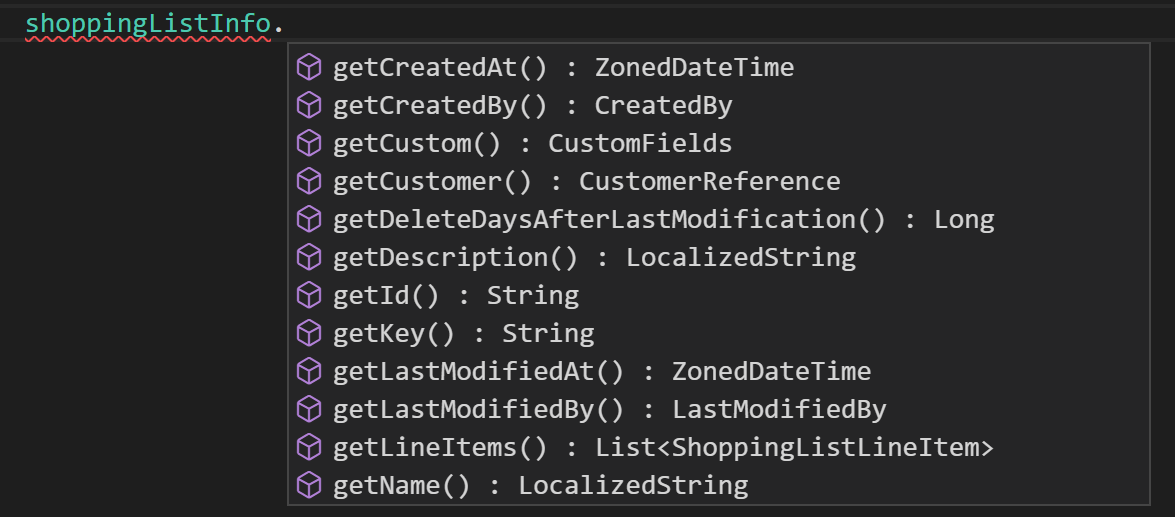
The `shoppingListInfo` object would then contain all the data of the specified Shopping List. You can access information from the fields within that object:
#### Get multiple resources
When returning a list of resources, use a `PagedQueryResponse` based on the resource you want to return. For example, a `ShoppingListPagedQueryResponse` returns Shopping Lists.
`PagedQueryResponse` is identical to [PagedQueryResult](/api/general-concepts.md#pagedqueryresult) in the HTTP API.
```java title="Get all Shopping Lists"
ShoppingListPagedQueryResponse allShoppingLists = httpApiRoot
.shoppingLists()
.get()
.executeBlocking()
.getBody();
```
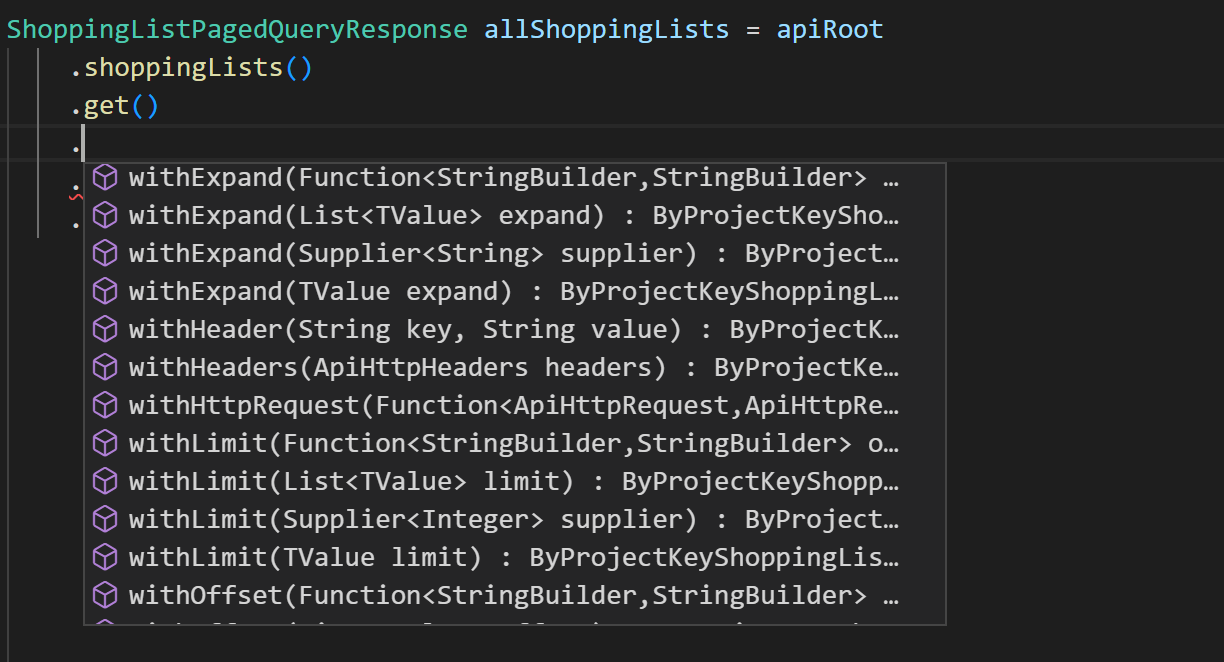
You can alter the results of these calls by including [`.withWhere()`](/api/predicates/query.md), [`.withSort()`](/api/general-concepts.md#sorting), [`.withExpand()`](/api/general-concepts.md#reference-expansion), [`.withLimit()`](/api/general-concepts.md#limit), or [`.withOffset()`](/api/general-concepts.md#offset) after `.get()`.
These are identical to the [parameters](/api/general-concepts.md#query-features) you can add to standard HTTP API calls. If your IDE supports autocomplete you can view a full list of methods available:
Query parameter methods come in two variants:
- `with*()`: sets the parameter value, replacing any previously set value (for example, `withLimit(20)` sets the limit to 20).
- `add*()`: adds an additional value alongside any already set (for example, `addSort("name asc")` followed by `addSort("createdAt desc")` applies both sort criteria).
##### Use the Query Predicate builder
For querying results you can also use the type safe [Query Predicate](/api/predicates/query.md) builders. They allow you to programmatically create a Query Predicate using the `withQuery` method.
```java title="Query Customers using the Query Predicate builder"
// Return all Customers that have not verified their email address
final CustomerPagedQueryResponse response = httpApiRoot
.customers()
.get()
.withQuery(c -> c.isEmailVerified().is(false))
.executeBlocking()
.getBody();
```
##### Access query results
Regardless of whether you use query parameters or the Query Predicate builder, you can access the list of resources within a `PagedQueryResponse` using `.getResults()`:
```java title="Access resources from a PagedQueryResponse"
ShoppingListPagedQueryResponse allShoppingLists = httpApiRoot
.shoppingLists()
.get()
.executeBlocking()
.getBody();
// Put the returned Shopping Lists in a new list
List listOfShoppingLists = allShoppingLists.getResults();
// Create a String containing the first Shopping List's English name
String firstShoppingListName = listOfShoppingLists.get(0).getName().get("en");
```
### Write a resource
When writing to a resource, include the `httpApiRoot` and the associated endpoint.
```java
// Create a Shopping List
ShoppingList newShoppingList = httpApiRoot
.shoppingLists()
// ...
// Update a Shopping List
ShoppingList updatedShoppingList = httpApiRoot
.shoppingLists()
// ...
```
#### Create a new resource
Creating a new resource requires a draft of the resource to create. For Shopping Lists this is a [ShoppingListDraft](/urn?urn=ctp%3Aapi%3Atype%3AShoppingListDraft). You create these drafts using [builders](/dev-tooling/java-sdk-getting-started.md#create-objects):
```java title="Create a ShoppingListDraft"
ShoppingListDraft newShoppingListDraft = ShoppingListDraft
.builder()
.name(
LocalizedString
.builder()
.addValue("en", "English name of Shopping List")
.build()
)
.build();
```
Include this draft within `post()` followed by `.executeBlocking()` and `.getBody()`.
```java title="Create a Shopping List"
ShoppingList newShoppingList = httpApiRoot
.shoppingLists()
.post(newShoppingListDraft)
.executeBlocking()
.getBody();
```
#### Update an existing resource
Updating an existing resource requires a `.withId()` or `.withKey()` that references a unique identifier of the resource.
```java
// Update a Shopping List
ShoppingList updatedShoppingList = httpApiRoot
.shoppingLists()
.withId("{shoppingListID}")
// ...
```
When posting to a specific resource, you must include a payload. This payload (in the case of Shopping Lists, a `ShoppingListUpdate`) contains an array of update actions and the last seen version of the resource.
You can create update actions and payloads by using [builders](/dev-tooling/java-sdk-getting-started.md#create-objects).
```java title="Build a ShoppingListUpdate"
// Create the payload - a ShoppingListUpdate - with the current version of the Shopping List and the update actions.
ShoppingListUpdate shoppingListUpdate = ShoppingListUpdateBuilder
.of()
.version(1L)
.plusActions(actionBuilder ->
actionBuilder.setKeyBuilder().key("a-new-shoppinglist-key")
)
.build();
```
You must pass the payload as an argument to the `.post()` method.
```java title="Update a Shopping List"
ShoppingList updatedShoppingList = httpApiRoot
.shoppingLists()
.withId("{shoppingListID}")
.post(shoppingListUpdate)
.executeBlocking()
.getBody();
```
### Delete a resource
Deleting a resource requires using the `.delete()` method with the last seen version of the resource. You must identify the resource to delete using `withId()` or `withKey()`.
```java title="Delete a Shopping List"
ShoppingList deletedShoppingList = httpApiRoot
.shoppingLists()
.withId("{shoppingListID}")
.delete()
.withVersion(1l)
.withDataErasure(true) // Include to erase related personal data
.executeBlocking()
.getBody();
```
### Retrieve the raw API response
The above examples use `.executeBlocking()` to return the resource as an instance of an object.
To return the response as a byte array instead, use `.sendBlocking()`. Note that with this approach you must create a byte array as the value to return:
```java title="Get the raw API response as a byte array"
byte[] shoppingLists = httpApiRoot.shoppingLists().get().sendBlocking().getBody();
// Convert to a String and output to the console
String shoppingListDetails = new String(
shoppingLists,
java.nio.charset.StandardCharsets.UTF_8
);
System.out.println(shoppingListDetails);
```
### Use GraphQL
The Java SDK has a [GraphQL module](https://central.sonatype.com/artifact/com.commercetools.sdk/commercetools-graphql-api) that provides type safe GraphQL support.
With the help of the [DGS codegen](https://netflix.github.io/dgs/generating-code-from-schema/) you can generate a type safe query and
projection builder. The results are then mapped to the correct response type.
The response types have all available fields, but only the projected will contain a value.
```java title="Query Products using the GraphQL module"
final GraphQLRequest productQuery = GraphQL
.products(query -> query.localeProjection(Collections.singletonList("en")))
.projection(root ->
root.results().id().key().productType().key().getParent().createdAt()
);
final ApiHttpResponse> response =
projectRoot.graphql().query(productQuery).executeBlocking();
final ProductQueryResult data = response.getBody().getData();
```
### Use non-blocking calls
The Java SDK also allows non-blocking calls which return a [CompletableFuture](https://docs.oracle.com/javase/8/docs/api/java/util/concurrent/CompletableFuture.html).
To return the resource as an instance of an object use `.execute()`. To return a byte array use `.send()`:
```java title="Make non-blocking API calls"
// Return all Shopping Lists using a CompletableFuture - execute()
apiRoot
.shoppingLists()
.get()
.execute()
.thenAccept(response -> {
ShoppingListPagedQueryResponse allShoppingLists = response.getBody();
// Assign the first Shopping List's ID to a string and output it to the console
String firstshoppingListID = allShoppingLists.getResults().get(0).getId();
System.out.println(firstshoppingListID);
})
.join();
// Return all Shopping Lists in a byte array using a CompletableFuture - send()
apiRoot
.shoppingLists()
.get()
.send()
.thenAccept(response -> {
byte[] shoppingLists = response.getBody();
// Convert to a String and output to the console
String shoppingListDetails = new String(
shoppingLists,
java.nio.charset.StandardCharsets.UTF_8
);
System.out.println(shoppingListDetails);
})
.join();
```
## Close the client
The Java SDK client holds resources including thread pools and IO connections. Call `close()` on the client when your application shuts down to release these resources:
```java title="Close the API client"
httpApiRoot.getApiHttpClient().close();
```
For application frameworks with lifecycle management (such as Spring), register the close call as a shutdown hook or use the `@PreDestroy` annotation.
## Next steps
Continue learning about the Java SDK by checking our [SDK code examples](/dev-tooling/sdk-example-code?activePath=java). You will find example code for creating, querying, and updating Customers and Products.
The [Me Endpoint Checkout app](/dev-tooling/sdk-example-applications.md#me-endpoint-checkout-app) demonstrates how to use the [Me endpoints](/api/me-endpoints-overview.md) to create an example web store.
## Related pages
- [Area overview page with navigation](/dev-tooling.md)
- [Previous page: Overview](/dev-tooling/jvm-sdk.md)
- [Next page: Middleware](/dev-tooling/java-sdk-middleware.md)