# Develop with GraphQL
As a developer, you are probably already familiar with the commercetools REST API (also known as the [HTTP API](/api)). We use the terms interchangeably in this module. You may have used the REST API to Create, Read, Update, and Delete (CRUD) resources like Customers, Carts, and Products. GraphQL is also used to manage data in commercetools. Why do we need another way to manage this data?
Some drawbacks to REST APIs in general are overfetching, underfetching, and the use of too many endpoints to find the information you want. Both GraphQL and the REST API have their own strengths and weaknesses. That's why commercetools supports both. For the full technical reference, see the [GraphQL API](/api/graphql.md) documentation.
GraphQL is not magic—you still need the appropriate access rights to manage data in any commercetools Project. The same steps used to access the REST API also apply here. First, we need to create an API Client, then an Oauth2 token and now we can use that token to interface with GraphQL. To refresh your knowledge on Authorization flows and API Clients you might want to review our [self-learning module](/learning-developer-essentials/authentication-authorization/overview.md).
Throughout this module, we will explore GraphQL using the [GraphQL Explorer](/merchant-center/developer-settings.md#graphql-explorer) in the Merchant Center. You can follow along using our tools or any other GraphQL tool (for example, [Postman](https://www.postman.com/)). To get started you will need to have a commercetools Project and some data in it; we will be using the commercetools [sample data](/merchant-center/organizations-teams-projects.md#create-a-project).
## REST overfetching
In REST, when you query an endpoint, you get all of the data returned from that endpoint without being able to specify the needed fields. For example, if you use REST to get Customer information, you get the entire Customer record. If, for example, you only want the email addresses of all of your Customers, you waste a lot of bandwidth returning other data fields (first name, last name, address, ID, version, etc.) that you will never use.
With GraphQL, you can specify which elements you want to have returned, so you can query for Customers and only retrieve their email addresses. If that is only 5% of each Customer record, you can retrieve 20 times as many customer records in the same size of data as you can with REST. That’s a big deal.
Let’s take a quick look at the GraphQL Explorer and fire off a request to a Project. Imagine the following scenario: you are required to complete a reconciliation check (that is, run a report on all of your Orders to compare the total price with your Order Management System). You need all Orders for the month and their `id`, `createdAt`, and `totalPrice` fields, alongside the `key` of the Customer who placed the Order.
Here's the query:
```graphql
query queryOrdersForCustomers {
orders(where: "createdAt > \"2016-10-01T00:00:00.000Z\"") {
results {
customer {
id
}
id
createdAt
totalPrice {
currencyCode
centAmount
}
}
}
}
```
Here's what it would look like running through the GraphQL Explorer:
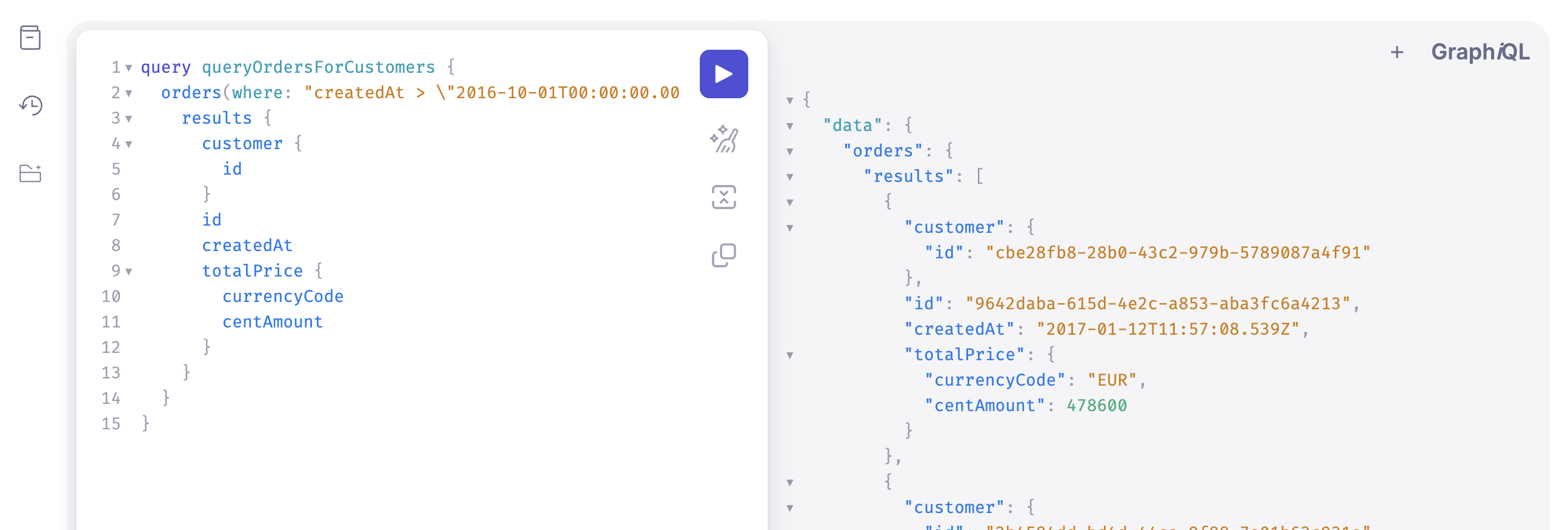
Using the RESTful API for this scenario would lead to a lot of overfetching of unnecessary fields. Here we can see that we only receive the data that we requested. Isn’t it great?
## REST underfetching
In REST a related problem to overfetching is underfetching. Again, if you want to read a Customer record with REST, you get all of the information about the Customer, but in commercetools, if a customer belongs to a Customer Group, the only info you get about that is a reference to the Customer Group. Even though you’ve gotten a lot of additional information beyond what you wanted, you still need to send a second request to get the related Customer Group information for that Customer—that’s underfetching.
In this situation, it's possible to use reference expansion and save a second request. For example, with REST in commercetools, you can retrieve the related Customer Group information in one request using reference expansion. But, with REST, the entire Customer Group object is returned when you do reference expansion. If all you need is the Customer Group name, you still get the `id`, `version`, times for creation, and the last update, as well as information about who did the creation and the last update. Now your underfetching problem is solved—but replaced with even more overfetching.
With GraphQL, you can choose only a few fields of information from the Customer record and include only the `name` field from the referenced Customer Group.
Let’s look at another example. Imagine a Product details page and all the data that we want to display on it to our customers. We need some data from the Cart, from Products, some Review rating statistics, and the top 5 Reviews.
```mermaid
sequenceDiagram
participant Product details page
participant Product Projection search endpoint
participant Reviews endpoint
participant Carts endpoint
Product details page->>+Product Projection search endpoint: Request Product data
Product Projection search endpoint-->>-Product details page: Return name, description, images, ReviewRatingStatistics
Product details page->>+Reviews endpoint: Request Reviews data
Reviews endpoint-->>-Product details page: Return top five reviews
Product details page->>+Carts endpoint: Request Cart data
Carts endpoint-->>-Product details page: Return active Cart
```
Looking at the diagram we can see something that resembles a waterfall request, where each request is made serially. This is not ideal for network latency.
GraphQL solves this problem by allowing us to query data from multiple endpoints in one call.
```mermaid
sequenceDiagram
participant Product details page
participant GraphQL endpoint
Product details page->>+GraphQL endpoint: Request data
GraphQL endpoint-->>-Product details page: Return name, description,
images, ReviewRatingStatistics,
top five reviews, active Cart
```
Rather than multiple requests being made serially, we now have one request only.
To sum it up, GraphQL is a great asset to help you write stable, robust, and performant applications, especially for fetching data.
## Related pages
- [Area overview page with navigation](/learning-developer-essentials.md)
- [Previous page: Overview](/learning-developer-essentials/graphql/overview.md)
- [Next page: Use the GraphQL Explorer and the SDK](/learning-developer-essentials/graphql/use-graphiql-and-the-sdk.md)