As this page encourages you to follow along in your own developer environment, make sure that you have followed all of the steps in the Prepare your work environment module to set up your IDE to work with commercetools Projects.
As we mentioned previously, the first step in the resource lifecycle is to create the resource. In commercetools, if we want to create a Customer, we must create and post a
CustomerDraft. We send the CustomerDraft to commercetools, and then receive a response that confirms the Customer has been created.
For multi-language SDK code snippets for creating Customers, see
SDK example code.

We can see that the CustomerDraft must have a unique email address. We know this because the field is marked with a red asterisk in the CustomerDraft representation. Any combination of the email field and any other field in the CustomerDraft can be used to create a Customer.
The
authenticationMode field controls whether a password is required when creating a Customer. When set to
Password (the default), the password field is required. When set to
ExternalAuth, the password field is optional. This mode is used when Customers authenticate through external identity providers such as OAuth, SSO, or social login systems.
Use the SDKs
Let’s have a look at how we create a CustomerDraft with the Java and TypeScript SDKs. We recommend following along with your IDE, but remember to adjust the file and package names as needed.
We will continue with the presented folder design from the Prepare your environment module. We will create a Service class (CustomerService.java / customer.js) in the impl-Package. This service class will prepare our requests.
An exercise class (CustomerExercise.java / exercise.js) will then use the prepared methods to combine those requests in a meaningful way. Here we will then log the results and verify that everything is working correctly.
In the TypeScript SDK, you must build the CustomerDraft yourself.
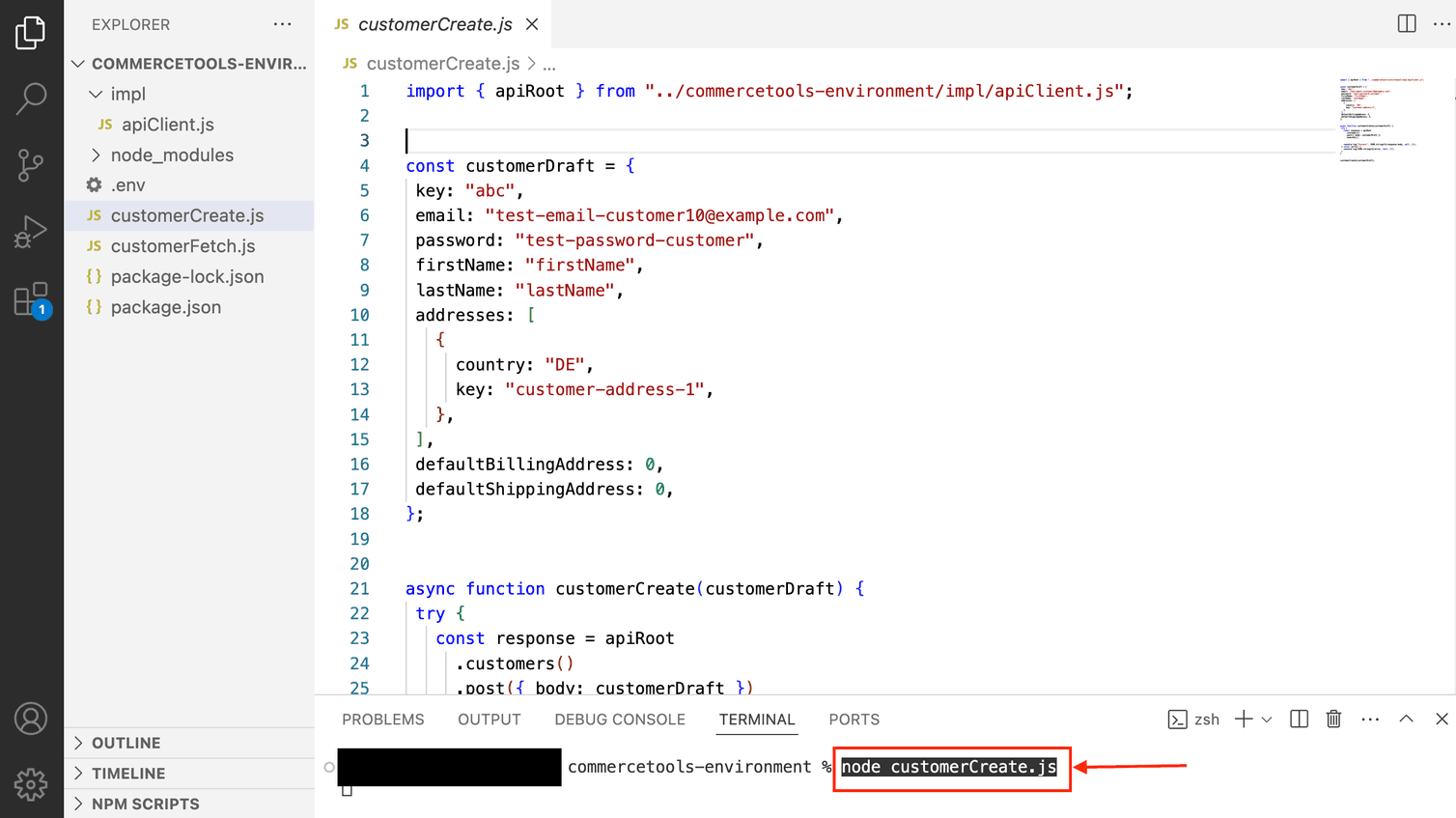
In the same repository you set up in the Prepare your work environment module, create a file called customerCreate.js and copy the following code into it:
import { apiRoot } from '../impl/apiClient.js';

const customerDraft = {
  key: 'abc',
  email: 'test-email-customer10@example.com',
  password: 'test-password-customer',
  authenticationMode: 'Password', // Default mode - password is required
  firstName: 'firstName',
  lastName: 'lastName',
  addresses: [
    {
      country: 'DE',
      key: 'customer-address-1',
    },
  ],
  defaultBillingAddress: 0,
  defaultShippingAddress: 0,
};

async function customerCreate() {
  try {
    const response = await apiRoot
      .customers()
      .post({ body: customerDraft })
      .execute();

    console.log('Success', JSON.stringify(response.body, null, 2));
  } catch (error) {
    console.log(JSON.stringify(error, null, 2));
  }
}

customerCreate();
Use the following command to execute the code in your terminal:
In the Java SDK we make extensive use of the builder pattern to construct objects. In the following example, we create a Customer with an address. To construct an address, use the builder pattern. Make sure that you provide all mandatory fields.
In the impl folder of the repository you set up in the Prepare your work environment module, create a service class called CustomerService.java and copy the following code into it:
package impl;

import com.commercetools.api.client.ProjectApiRoot;
import com.commercetools.api.models.common.AddressDraftBuilder;
import com.commercetools.api.models.customer.*;

import io.vrap.rmf.base.client.ApiHttpResponse;
import java.util.concurrent.CompletableFuture;

public class CustomerService {

  final ProjectApiRoot apiRoot;

  public CustomerService(final ProjectApiRoot client) {
    this.apiRoot = client;
  }

  public CompletableFuture<ApiHttpResponse<CustomerSignInResult>> createCustomer(
       final String email,
       final String password,
       final String customerKey,
       final String firstName,
       final String lastName,
       final String country) {

        return
           apiRoot
           .customers()
           .post(
              CustomerDraftBuilder.of()
                .firstName(firstName)
                .lastName(lastName)
                .key(customerKey)
                .email(email)
                .password(password)
                .addresses(
                    AddressDraftBuilder.of()
                      .firstName(firstName)
                      .lastName(lastName)
                      .key(customerKey + "-home")
                      .country(country)
                      .build()
                )
              .build()
            )
            .execute();
        }

}
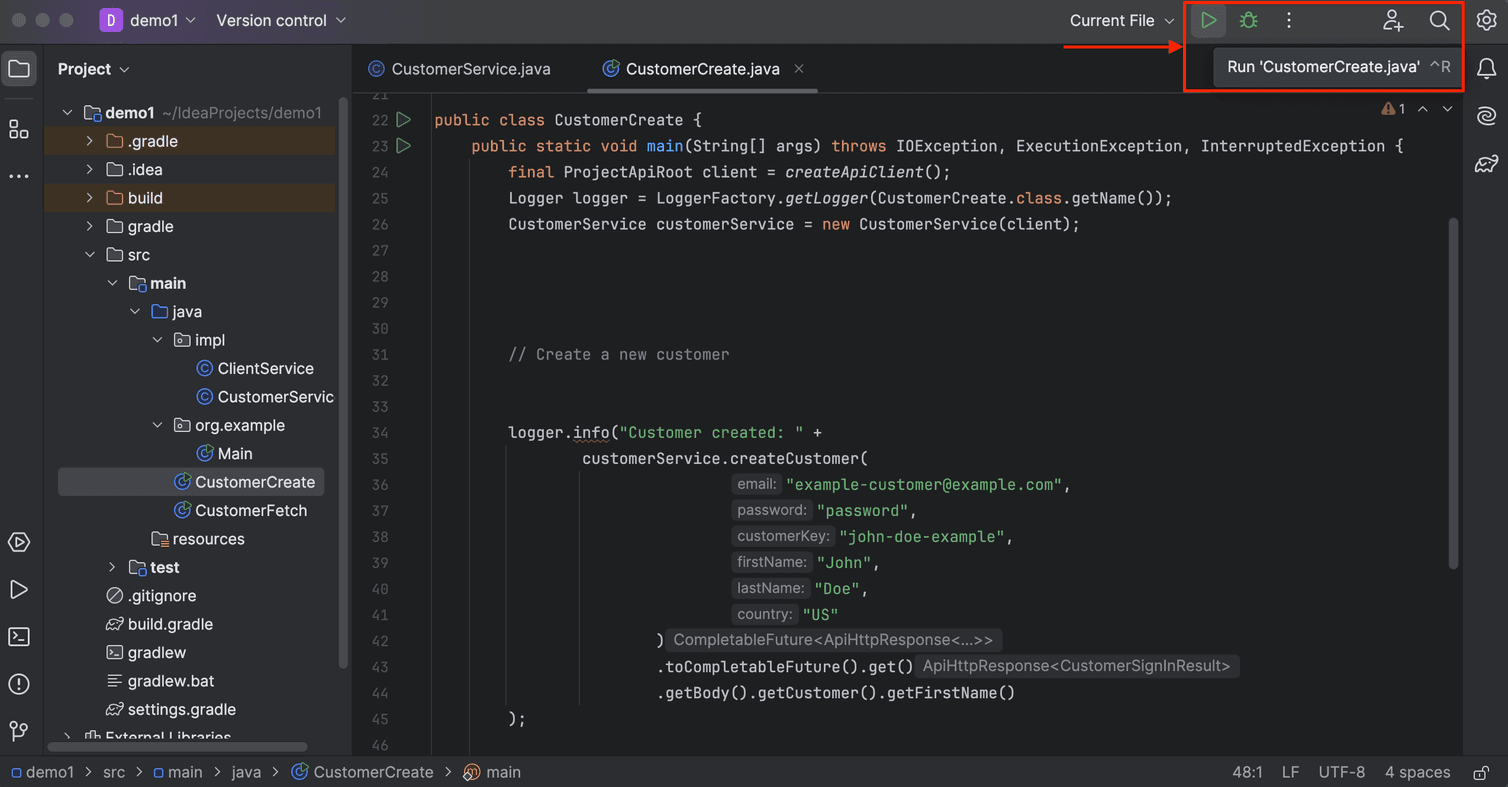
Create a second file called CustomerCreate.java in the main folder of the same repository.
import com.commercetools.api.client.ProjectApiRoot;
import impl.CustomerService;
import org.slf4j.Logger;
import org.slf4j.LoggerFactory;

import java.io.IOException;
import java.util.concurrent.ExecutionException;

import static impl.ClientService.createApiClient;

public class CustomerCreate {
  public static void main(String[] args) throws IOException, ExecutionException, InterruptedException {

    final ProjectApiRoot client = createApiClient();
    Logger logger = LoggerFactory.getLogger(CustomerCreate.class.getName());
    CustomerService customerService = new CustomerService(client);

    // Create a new customer

    logger.info("Customer created: " +
        customerService.createCustomer(
            "example-customer@example.com",
            "password",
            "john-doe-example",
            "John",
            "Doe",
            "US"
          )
        .toCompletableFuture().get()
        .getBody().getCustomer().getFirstName()
      );
   }
}
Let’s run our code.
In the .NET SDK we use object initializers to construct objects. In the following example, we create a Customer with an address. To construct an address, set the mandatory fields on a BaseAddress. Make sure that you provide all mandatory fields.
In the impl folder of the repository you set up in the Prepare your work environment module, create a service class called CustomerService.cs and copy the following code into it:
using commercetools.Sdk.Api.Client;
using commercetools.Sdk.Api.Models.Customers;
using commercetools.Sdk.Api.Models.Common;

public class CustomerService
{
  private readonly ProjectApiRoot projectApiRoot;

  public CustomerService(ProjectApiRoot client)
  {
    this.projectApiRoot = client;
  }

  public async Task<ICustomerSignInResult> CreateCustomer(
      string email,
      string password,
      string customerKey,
      string firstName,
      string lastName,
      string country)
  {
    return await projectApiRoot
        .Customers()
        .Post(
            new CustomerDraft
            {
              FirstName = firstName,
              LastName = lastName,
              Key = customerKey,
              Email = email,
              Password = password,
              Addresses = new List<IBaseAddress>
              {
                new BaseAddress
                {
                  FirstName = firstName,
                  LastName = lastName,
                  Key = customerKey + "-home",
                  Country = country
                }
              }
            }
        )
        .ExecuteAsync();
  }
}
Create a second file called CustomerCreate.cs in the main folder of the same repository.
using commercetools.Sdk.Api.Client;
using Microsoft.Extensions.Logging;

public class CustomerCreate
{
  public static async Task Main(string[] args)
  {
    // Create the API client (see the Prepare your work environment module)
    ProjectApiRoot client = ClientService.CreateApiClient();

    ILoggerFactory loggerFactory = LoggerFactory.Create(builder => builder.AddConsole());
    ILogger logger = loggerFactory.CreateLogger<CustomerCreate>();

    CustomerService customerService = new CustomerService(client);

    // Create a new customer
    var result = await customerService.CreateCustomer(
        "example-customer@example.com",
        "password",
        "john-doe-example",
        "John",
        "Doe",
        "US"
    );

    logger.LogInformation("Customer created: " + result.Customer.FirstName);
  }
}
Let’s run our code.
Response
Let’s see what a successful response looks like.
If our Customer has been created, we can view them in the Merchant Center:

Here in our example you can see that the new Customer has been created.
After creating a Customer with the SDK, you should also receive a JSON response as follows:
{
  "customer": {
    "id": "cfab735c-2693-4a27-980c-921686c6750b",
    "version": 1,
    "createdAt": "2024-01-16T06:00:31.099Z",
    "lastModifiedAt": "2024-01-16T06:00:31.099Z",
    "lastModifiedBy": {
      "clientId": "VdkVvQ_2M82WsxJFU3A8A6Fz",
      "isPlatformClient": false
    },
    "createdBy": {
      "clientId": "VdkVvQ_2M82WsxJFU3A8A6Fz",
      "isPlatformClient": false
    },
    "email": "example-customer@example.com",
    "firstName": "John",
    "lastName": "Doe",
    "password": "**removed from output**",
    "addresses": [
      {
        "id": "yUmV0kHa",
        "firstName": "John",
        "lastName": "Doe",
        "country": "US",
        "key": "john-doe-example-home"
      }
    ],
    "shippingAddressIds": [],
    "billingAddressIds": [],
    "isEmailVerified": false,
    "key": "john-doe-example",
    "stores": [],
    "authenticationMode": "Password"
  }
}
Nice work! Let’s do a quick knowledge check before moving on to the next operation.