Best deal discounts and Discount Groups
While beneficial for customers, this approach frequently eroded profit margins. Merchants wanted the flexibility to say, "If the item is already on sale, the coupon should not apply to it unless it offers a greater savings."
price.discounted). This was fragile and hard to maintain. The default behavior (Stacking) often resulted in customers receiving a sale price plus a Cart Discount.discountsConfiguration in the Project settings allows you to modify this default behavior. You can now choose between:Stacking: the traditional behavior. Both Product Discounts and Cart Discounts are applied.BestDeal: the new option. The engine now compares the Product Discount against the Cart Discount and applies only the one that provides the largest discount for the customer. This prevents "double dipping."
In the project that has the B2C Sample Data you should have the following two discounts:
- 15% Off All Armchairs (Product Discount)
- Buy One Item of Furniture and Receive the Second for Free (Cart Discount)
Let’s see what happens by default when we create a cart with two armchairs and use the code required for the Cart Discount (“BOGO”):
// Ensure all necessary imports are included and the API client is instantiated as demonstrated in the first example.

// Create a cart with two line items and a discount code
const result = await apiRoot
  .carts()
  .post({
    body: {
      currency: "EUR",
      country: "DE",
      lineItems: [{ sku: "GARM-093" }, { sku: "TARM-03" }],
      discountCodes: ["BOGO"],
    },
  })
  .execute();

const cart = result.body;

// Print a summary of each Line Item, including price and any discount
console.log("Cart Line Items:");
cart.lineItems.forEach((item, idx) => {
  // Get product name
  const name = item.name["en-US"];
  const quantity = item.quantity;
  // Regular unit price
  const price = item.price.value.centAmount / 100;
  // Discounted price if available
  const discountedPrice =
    item.discountedPricePerQuantity?.[0]?.discountedPrice?.value?.centAmount;
  const discounted =
    discountedPrice !== undefined ? discountedPrice / 100 : price;
  // Show discounted price if present
  const discountInfo =
    discountedPrice !== undefined
      ? ` (Discounted Price: €${discounted.toFixed(2)})`
      : "";
  console.log(
    `#${idx + 1}: ${name} x${quantity} - Unit Price: €${price.toFixed(
      2
    )}${discountInfo}`
  );
});

// Print the total Cart price
const total = cart.totalPrice.centAmount / 100;
console.log("-----------------------------");
console.log(`Total Cart Price: €${total.toFixed(2)}`);
Cart Line Items:
#1: Glam Armchair x1 - Unit Price: €599.00 (Discounted Price: €509.15)
#2: Turner Velvet Armchair x1 - Unit Price: €399.00 (Discounted Price: €0.00)
-----------------------------
Total Cart Price: €509.15
The results confirm that both armchairs were discounted. The Glam Armchair received a 15% product discount, while the Turner Velvet Chair received a 100% discount as configured in the Cart Discount.
 Now, let’s run the same code again and look at the result:
Cart Line Items:
#1: Glam Armchair x1 - Unit Price: €599.00
#2: Turner Velvet Armchair x1 - Unit Price: €399.00 (Discounted Price: €0.00)
-----------------------------
Total Cart Price: €599.00
In this instance, only the Cart Discount was applied because it offered the customer a superior overall deal.
stackingMode and SortOrder for each individual Cart Discount.
Fortunately, Discount Groups now significantly streamline this process. This feature allows you to bundle several Cart Discounts under a single logical entity. On top of that, you can now deactivate the entire group in one request when the grouped discounts are no longer relevant.Let’s use it to create an example group with the following information:
- Group name:
Candle Bar Promo Week - Group key:
candle-bar-promo - Rank:
0.6 - Discount prioritization mode: Best Deal
The only remaining step is to incorporate the desired Cart Discounts into the newly established group.
- Save 10% on all Bar Accessories when you buy a Vanilla Candle (
sortOrder:0.7) - Save 20% on all Bar Accessories when you buy an Evergreen Candle (
sortOrder:0.4)
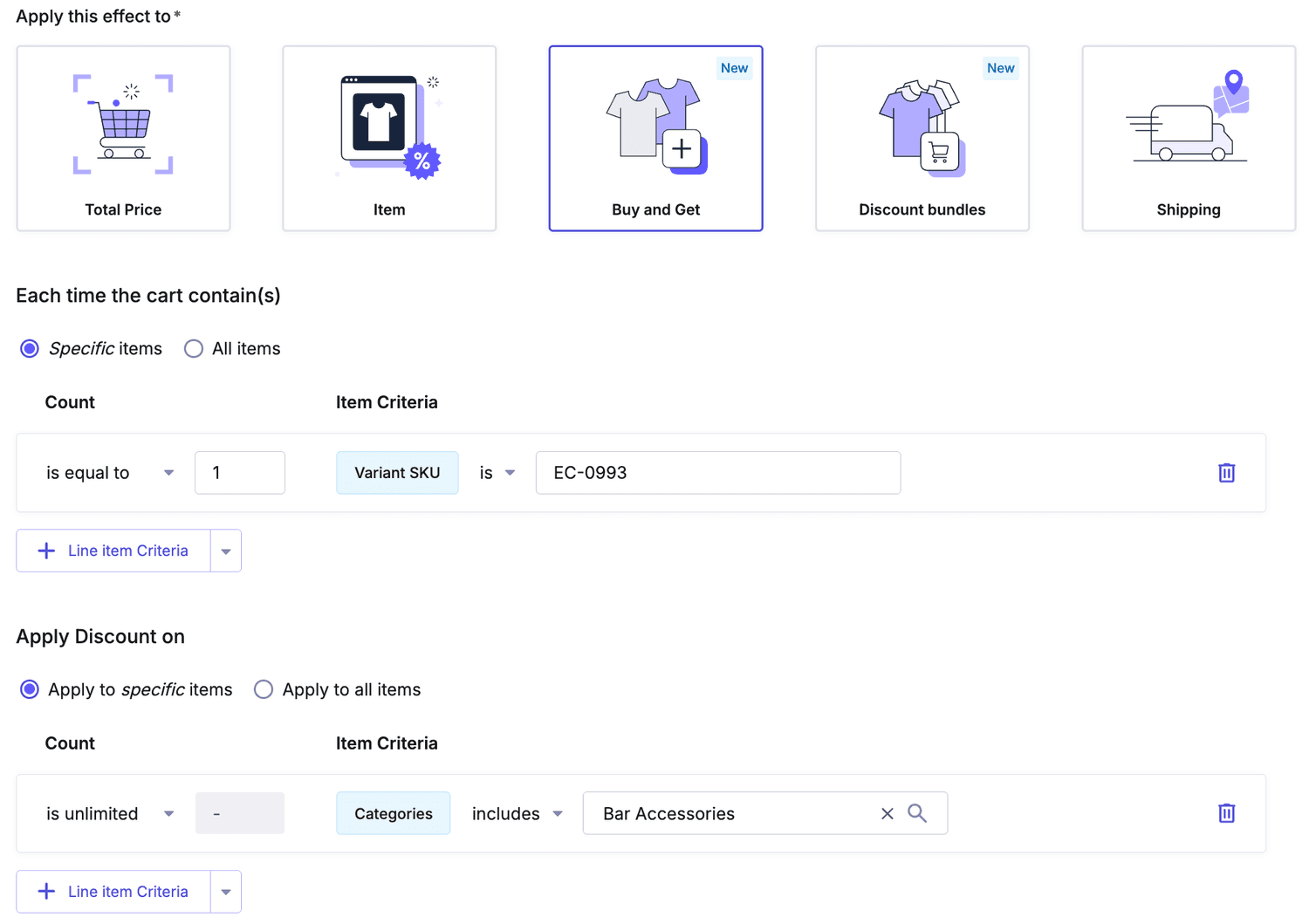
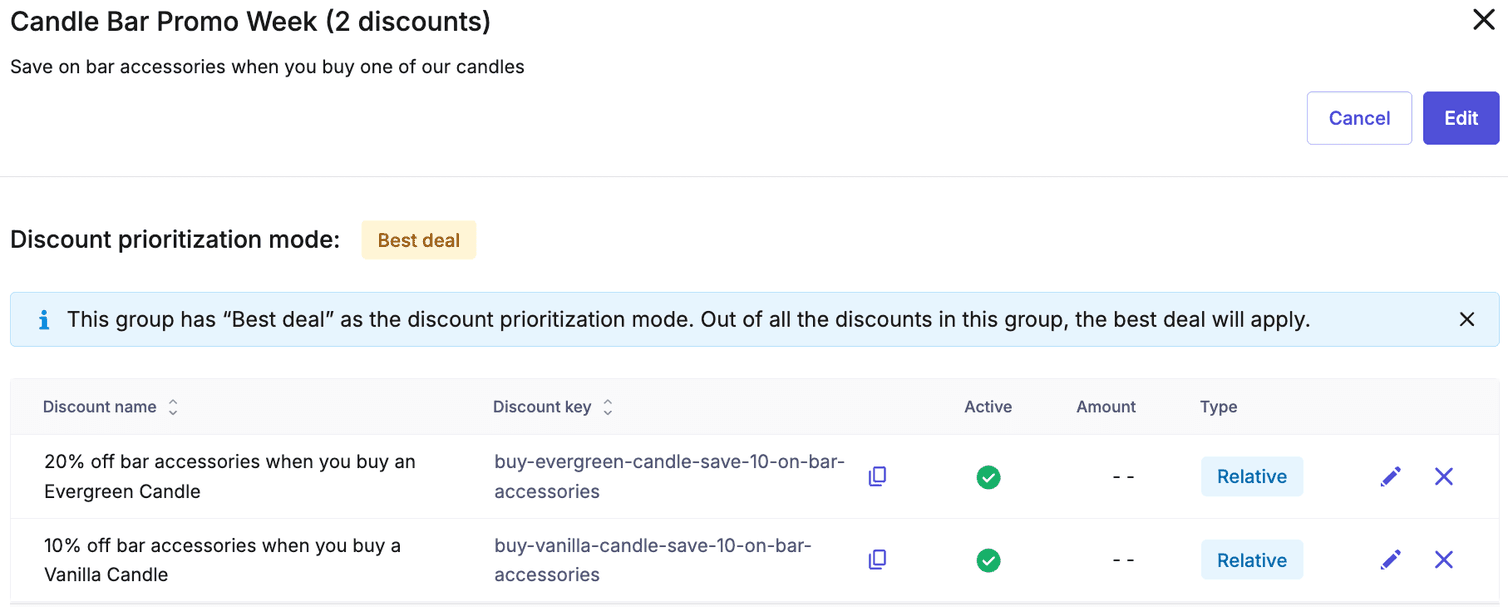
Once we have our two discounts created and added to the group, we can go ahead and create a new Cart with a Vanilla Candle(SKU: VC-01), Evergreen Candle (SKU: EC-0993) and a Bar Accessory (Wine Bottle Opener, SKU: WOP-09). We can actually reuse the code from before and just change the part responsible for creating the cart:
// Same as before

// Create a cart with three line items
const result = await apiRoot
  .carts()
  .post({
    body: {
      currency: "EUR",
      country: "DE",
      lineItems: [{ sku: "VC-01" }, { sku: "EC-0993" }, { sku: "WOP-09" }],
    },
  })
  .execute();

// Same as before
Cart Line Items:
#1: Vanilla Candle x1 - Unit Price: €9.99
#2: Evergreen Candle x1 - Unit Price: €2.99 (Discounted Price: €2.75)
#3: Wine Bottle Opener x1 - Unit Price: €1.99 (Discounted Price: €1.83)
-----------------------------
Total Cart Price: €14.57
The cart price shows a discount of €0.40, which correctly represents a 20% discount on the Wine Bottle Opener (€1.99). However, it is unusual that the discount was also applied to the Evergreen candle. Can you guess why? Read on to find out!
Relative Cart Discount distribution modes
applicationMode field to CartDiscountValueAbsoluteDraft in 2024 provided users with enhanced control over the distribution of absolute discounts across specific line items.applicationMode field to CartDiscountValueRelativeDraft.You can also configure this setting when creating a new Cart Discount directly within the Merchant Center.
applicationMode is set to ProportionateDistribution by default:
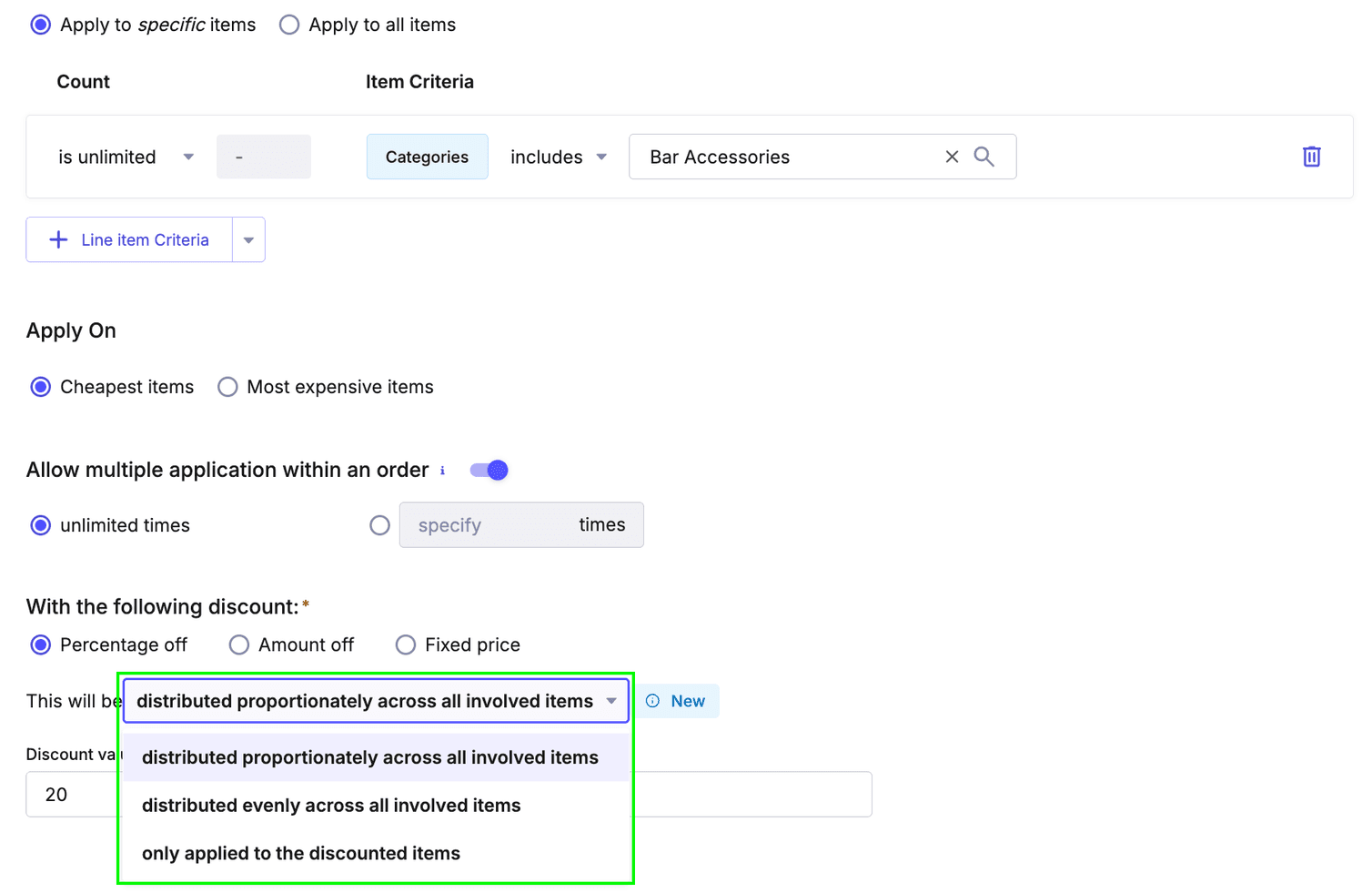
This means that each line item involved in the discount (Evergreen candle and Wine bottle opener) were proportionally discounted by 8% to reduce the cart total price by €0.40 which is 20% of the price of the Wine bottle opener (€1.99).
IndividualApplication (only applied to the discounted items) on both discounts in the group and run the code again, you should see the following result:Cart Line Items:
#1: Vanilla Candle x1 - Unit Price: €9.99
#2: Evergreen Candle x1 - Unit Price: €2.99
#3: Wine Bottle Opener x1 - Unit Price: €1.99 (Discounted Price: €1.59)
-----------------------------
Total Cart Price: €14.57
This time the discount was applied only to the Wine Bottle Opener.
EvenDistribution (distributed evenly across all involved items)?Cart Line Items:
#1: Vanilla Candle x1 - Unit Price: €9.99
#2: Evergreen Candle x1 - Unit Price: €2.99 (Discounted Price: €2.79)
#3: Wine Bottle Opener x1 - Unit Price: €1.99 (Discounted Price: €1.79)
-----------------------------
Total Cart Price: €14.57
As you probably guessed, the total Cart Discount of €0.40 was distributed evenly across all items involved in the discount and distributed evenly (€0.20 each).