Best deal discounts
While great for customers, this often hurt margins. Merchants wanted the ability to say, "If the item is already on sale, the coupon shouldn't apply to it unless it's a better deal."
price.discounted). These solutions were brittle and hard to maintain. By default, the stacking behavior meant customers often got a sale price plus a Cart Discount.discountsConfiguration in the Project settings allows you to change this default behavior. You can now choose between:Stacking: the classic behavior. Product Discounts and Cart Discounts both apply.BestDeal: the new capability. The engine compares the Product Discount against the Cart Discount and applies only the one that results in the lowest price for the customer. No more double dipping.
The first thing to do would be to create a Product Discount and a Cart Discount that could potentially overlap, for example:
-
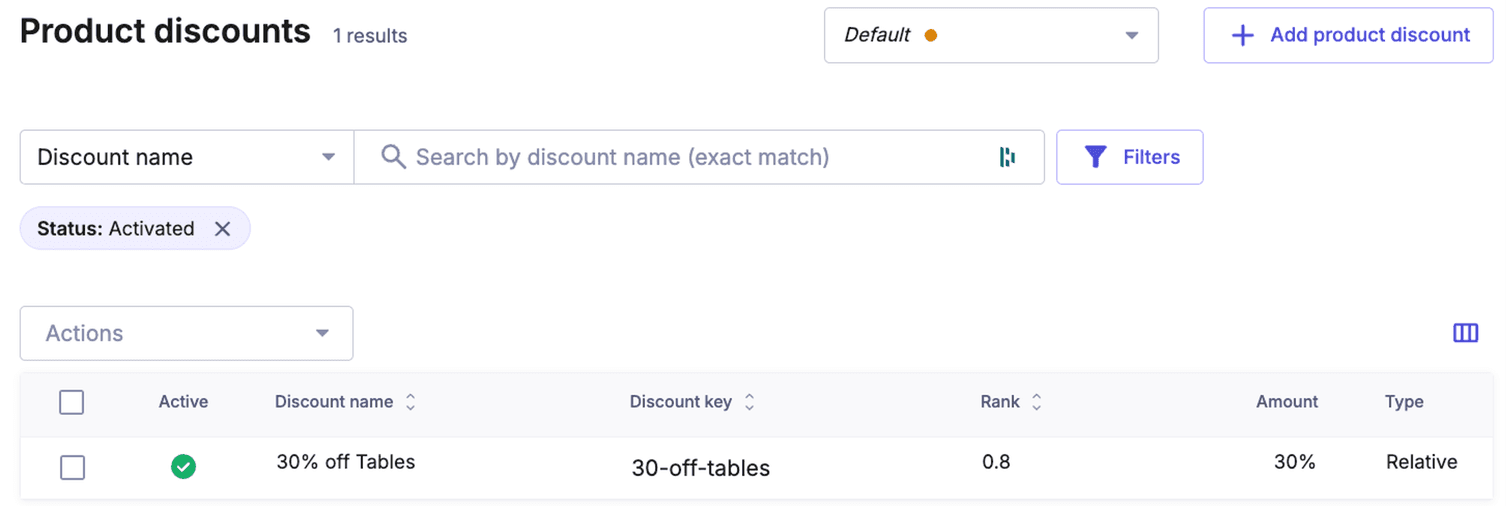
Product Discount where a customer saves 30% on items from the "Tables" category.
-
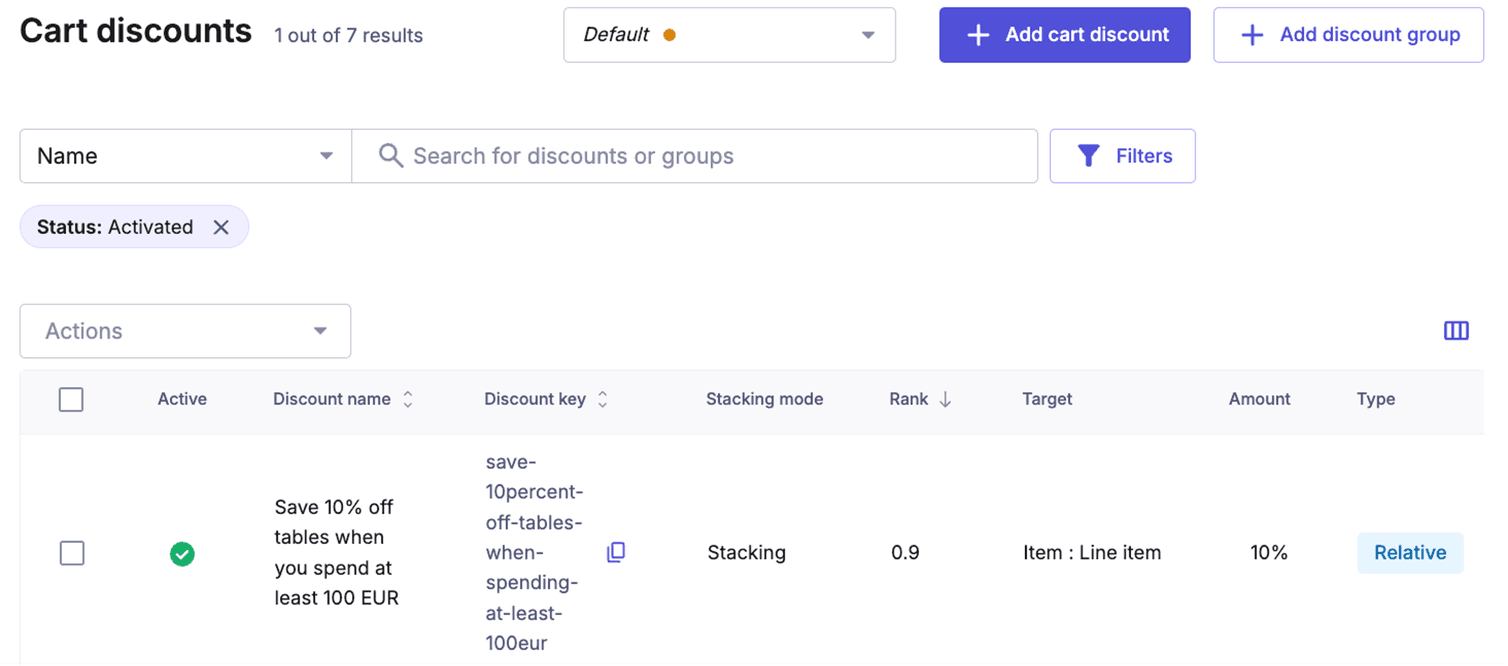
Cart Discount (created in the Merchant Center) where customers would get 10% off all tables if the Cart total is at least 100 EUR:
Let’s see what happens by default when we create a new Cart and add an item from the "Tables" category to it:
curl -X POST "https://api.{region}.commercetools.com/{projectKey}/carts" \
  -H "Authorization: Bearer {bearerToken}" \
  -H "Content-Type: application/json" \
  --data '{
    "currency": "EUR",
    "country": "DE",
    "lineItems": [
      {
        "sku": "GMCT-01"
      }
    ]
  }' | jq
{
  "type": "Cart",
  "id": "8974e6bb-ed84-4749-87f1-41ee5b4cbc66",
  "version": 3,
...
      "price": {
        "id": "472112d6-623c-42e9-870b-b3c4baf83c3d",
        "value": {
          "type": "centPrecision",
          "currencyCode": "EUR",
          "centAmount": 25999,
          "fractionDigits": 2
        },
        "key": "25999EUR",
        "country": "DE",
        "discounted": {
          "value": {
            "type": "centPrecision",
            "currencyCode": "EUR",
            "centAmount": 18199,
            "fractionDigits": 2
          },
          "discount": {
            "typeId": "product-discount",
            "id": "fdea6c60-190e-412c-bd02-1edd6f2211b6"
          }
        }
      },
      "quantity": 1,
      "discountedPrice": {
        "value": {
          "type": "centPrecision",
          "currencyCode": "EUR",
          "centAmount": 16379,
          "fractionDigits": 2
        },
        "includedDiscounts": [
          {
            "discount": {
              "typeId": "cart-discount",
              "id": "e3e9aea0-4b77-4e4c-978b-ba7645c772a1"
            },
            "discountedAmount": {
              "type": "centPrecision",
              "currencyCode": "EUR",
              "centAmount": 1820,
              "fractionDigits": 2
            }
          }
        ]
      },
      "discountedPricePerQuantity": [
        {
          "quantity": 1,
          "discountedPrice": {
            "value": {
              "type": "centPrecision",
              "currencyCode": "EUR",
              "centAmount": 16379,
              "fractionDigits": 2
            },
            "includedDiscounts": [
              {
                "discount": {
                  "typeId": "cart-discount",
                  "id": "e3e9aea0-4b77-4e4c-978b-ba7645c772a1"
                },
                "discountedAmount": {
                  "type": "centPrecision",
                  "currencyCode": "EUR",
                  "centAmount": 1820,
                  "fractionDigits": 2
                }
              }
            ]
          }
        }
      ],
      "perMethodTaxRate": [],
      "addedAt": "2025-11-19T11:24:23.875Z",
      "lastModifiedAt": "2025-11-19T11:24:23.875Z",
      "state": [
        {
          "quantity": 1,
          "state": {
            "typeId": "state",
            "id": "f0527c44-0718-4a8c-bdfe-c94d581bf76e"
          }
        }
      ],
      "priceMode": "Platform",
      "lineItemMode": "Standard",
      "priceRoundingMode": "HalfEven",
      "totalPrice": {
        "type": "centPrecision",
        "currencyCode": "EUR",
        "centAmount": 16379,
        "fractionDigits": 2
      },
      "taxedPricePortions": []
    }
  ],
  "cartState": "Active",
  "totalPrice": {
    "type": "centPrecision",
    "currencyCode": "EUR",
    "centAmount": 16379,
    "fractionDigits": 2
  },
...
  "discountTypeCombination": {
    "type": "Stacking"
  },
  "totalLineItemQuantity": 1
}
discountTypeCombination field confirms that stacking was used.
Now let’s create the same Cart again and look at the result:
{
  "type": "Cart",
  "id": "6bb3f8d4-69a4-4642-9223-807f54feab8a",
  "version": 2,
...
      "price": {
        "id": "472112d6-623c-42e9-870b-b3c4baf83c3d",
        "value": {
          "type": "centPrecision",
          "currencyCode": "EUR",
          "centAmount": 25999,
          "fractionDigits": 2
        },
        "key": "25999EUR",
        "country": "DE",
        "discounted": {
          "value": {
            "type": "centPrecision",
            "currencyCode": "EUR",
            "centAmount": 18199,
            "fractionDigits": 2
          },
          "discount": {
            "typeId": "product-discount",
            "id": "fdea6c60-190e-412c-bd02-1edd6f2211b6"
          }
        }
      },
      "quantity": 1,
      "discountedPricePerQuantity": [],
      "perMethodTaxRate": [],
      "addedAt": "2025-11-19T11:27:57.052Z",
      "lastModifiedAt": "2025-11-19T11:27:57.052Z",
      "state": [
        {
          "quantity": 1,
          "state": {
            "typeId": "state",
            "id": "f0527c44-0718-4a8c-bdfe-c94d581bf76e"
          }
        }
      ],
      "priceMode": "Platform",
      "lineItemMode": "Standard",
      "priceRoundingMode": "HalfEven",
      "totalPrice": {
        "type": "centPrecision",
        "currencyCode": "EUR",
        "centAmount": 18199,
        "fractionDigits": 2
      },
      "taxedPricePortions": []
    }
  ],
  "cartState": "Active",
  "totalPrice": {
    "type": "centPrecision",
    "currencyCode": "EUR",
    "centAmount": 18199,
    "fractionDigits": 2
  },
...
  "discountTypeCombination": {
    "type": "BestDeal",
    "chosenDiscountType": "ProductDiscount"
  },
  "totalLineItemQuantity": 1
}
In this scenario, only one discount—either a Product Discount or a Cart Discount—could be applied. The Product Discount is chosen as the superior option because it provides the customer with a greater overall saving (30% off tables versus just 10%).
Discount Groups
If you run high-volume campaigns (like Black Friday or Cyber Week), you know the struggle:
- The math problem: if a user has five different coupons, how do you ensure they only get the single best one without writing complex
sortOrderlogic? - The panic button problem: when a campaign ends, how do you turn off 50 different discount rules instantly without clicking 50 times?
Discount Groups introduced in 2025 can solve both of those problems.
StackingMode: StopAfterThisDiscount and rigorous management of sortOrder.It was brittle. If the "10% Off" Cart Discount had a higher sort order than the "$5 Off" one, the 10% off would always "win" and stop the chain—even if the $5 off was actually a better deal for the customer!
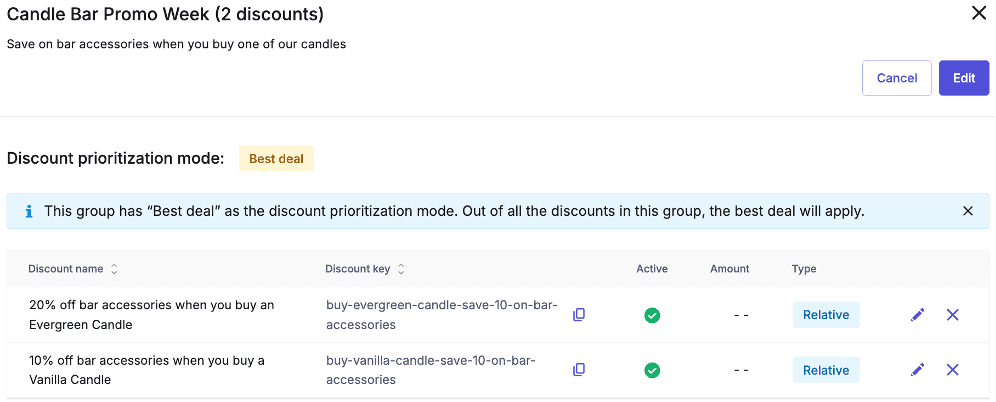
Let’s use it to create an example group with the following information:
- Group name:
Candle Bar Promo Week - Group key:
candle-bar-promo - Rank:
0.6 - Discount prioritization mode: Best Deal
The only remaining step is to incorporate the desired Cart Discounts into the newly established group.
You can create the following Cart Discounts using the Merchant Center UI (as shown in previous steps), or alternatively via the API if you prefer automation. For this example, we'll use the Merchant Center:
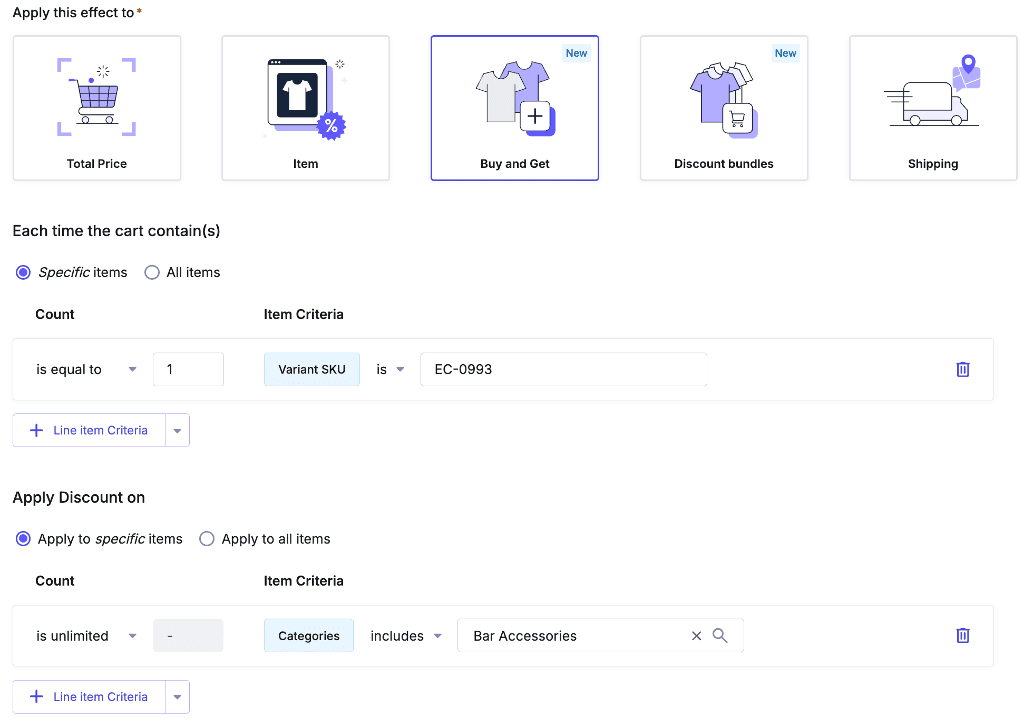
- Save 10% on all Bar Accessories when you buy a Vanilla Candle (
sortOrder:0.7) - Save 20% on all Bar Accessories when you buy an Evergreen Candle (
sortOrder:0.4)
curl  -X 'POST' \
  'https://api.{region}.commercetools.com/{projectKey}/carts' \
  -H 'Content-Type: application/json' \
  -H 'Authorization: Bearer {bearerToken}' \
  -d '{
    "currency": "EUR",
    "country": "DE",
    "lineItems": [
      {
        "sku": "VC-01"
      },
      {
        "sku": "EC-0993"
      },
      {
        "sku": "WOP-09"
      }
    ]
  }
' | jq
{
  "type": "Cart",
  "id": "b55dc4f2-6e3e-4619-b984-332be4e27268",
  "version": 3,
  "versionModifiedAt": "2025-12-08T13:18:02.399Z",
  "lastMessageSequenceNumber": 1,
  "createdAt": "2025-12-08T13:18:02.399Z",
  "lastModifiedAt": "2025-12-08T13:18:02.399Z",
  "lastModifiedBy": {
    "isPlatformClient": true,
    "user": {
      "typeId": "user",
      "id": "2a528594-4c01-48cb-9ef9-6cc3620978d1"
    }
  },
  "createdBy": {
    "isPlatformClient": true,
    "user": {
      "typeId": "user",
      "id": "2a528594-4c01-48cb-9ef9-6cc3620978d1"
    }
  },
  "lineItems": [
...
      "name": {
        "en-US": "Vanilla Candle",
        "en-GB": "Vanilla Candle",
        "de-DE": "Kerze mit Vanilleduft"
      },
...
      "name": {
        "en-US": "Evergreen Candle",
        "en-GB": "Evergreen Candle",
        "de-DE": "Kerze \"Evergreen\""
      },
...
      "name": {
        "en-US": "Wine Bottle Opener",
        "en-GB": "Wine Bottle Opener",
        "de-DE": "Korkenzieher"
      },
...
      "price": {
        "id": "060e78c1-c2ba-4424-ad18-a6e5a419ae85",
        "value": {
          "type": "centPrecision",
          "currencyCode": "EUR",
          "centAmount": 199,
          "fractionDigits": 2
        },
        "key": "199EUR",
        "country": "DE"
      },
      "quantity": 1,
      "discountedPricePerQuantity": [
        {
          "quantity": 1,
          "discountedPrice": {
            "value": {
              "type": "centPrecision",
              "currencyCode": "EUR",
              "centAmount": 183,
              "fractionDigits": 2
            },
            "includedDiscounts": [
              {
                "discount": {
                  "typeId": "cart-discount",
                  "id": "3aafd31c-53ff-42aa-858b-fbf8ed432944"
                },
                "discountedAmount": {
                  "type": "centPrecision",
                  "currencyCode": "EUR",
                  "centAmount": 16,
                  "fractionDigits": 2
                }
              }
            ]
          }
        }
      ],
...
  "discountTypeCombination": {
    "type": "Stacking"
  },
  "totalLineItemQuantity": 3
}
The system correctly applied the intended logic of our Discount Group. Although the Cart qualified for two discounts, and the 10% discount had a higher ranking, the 20% discount was the only one applied. This is because the 20% discount provided the customer with the better offer.
Relative Cart Discount distribution modes
We have continually enhanced the flexibility of how Cart Discounts are applied.
applicationMode field to CartDiscountValueAbsoluteDraft. This gave users greater control over how absolute discounts are distributed across specific line items.applicationMode field to CartDiscountValueRelativeDraft.This setting can also be found when creating a new Cart Discount in the Merchant Center.
In the previous chapter, did you observe anything unusual about the discount application on the line items?
applicationMode was set to ProportionateDistribution by default:
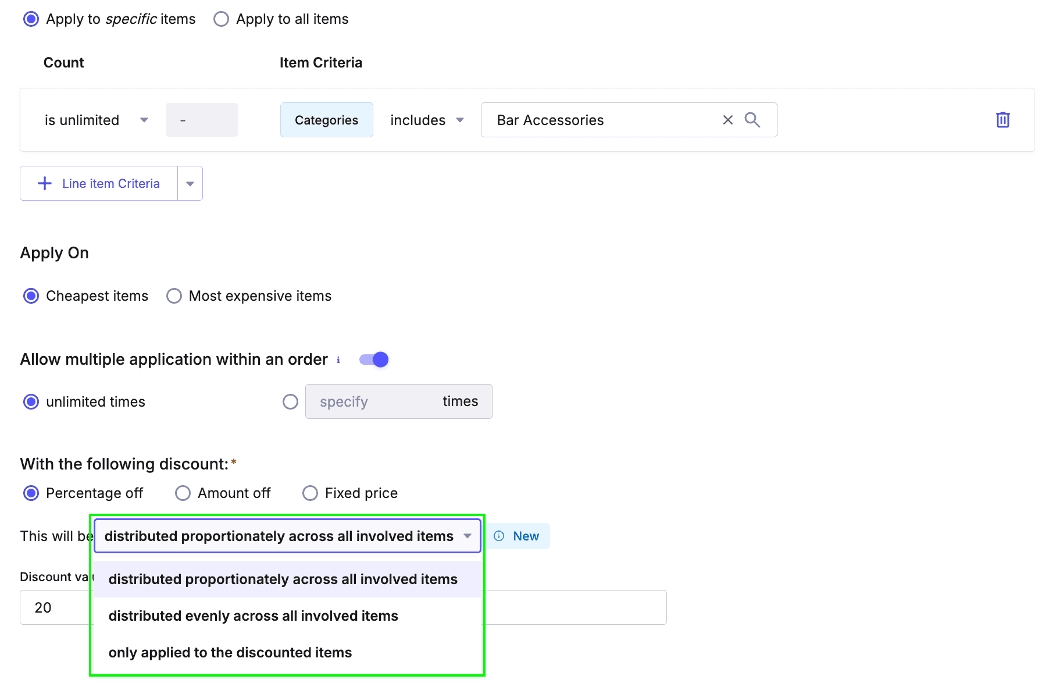
applicationMode settings on the 20% discount by creating a new Cart containing an Evergreen Candle and various bar accessories:curl -X 'POST' \
'https://api.{region}.commercetools.com/{projectKey}/carts' \
-H 'Content-Type: application/json' \
-H 'Authorization: Bearer {bearerToken}' \
-d '{
"currency": "EUR",
"country": "DE",
"lineItems": [
{
"sku": "EC-0993"
},
{
"sku": "WOP-09"
},
{
"sku": "WTP-09"
},
{
"sku": "BUCK-023"
}
]
}
' | jq
ProportionateDistribution(distributed proportionately across all involved items):
| Name | Qty | Unit Price | Discount | Final Price |
|---|---|---|---|---|
| Evergreen Candle | 1 | € 2.99 | € 0.50 | € 2.49 |
| Wine Bottle Opener | 1 | € 1.99 | € 0.34 | € 1.65 |
| Willow Teapot | 1 | € 8.99 | € 1.51 | € 7.48 |
| Ice Bucket | 1 | € 4.99 | € 0.84 | € 4.15 |
| Cart total: | 4 | € 18.96 | € 3.19 | € 15.77 |
The total price of the bar accessories was €15.97. The discount is calculated as 20% of the bar accessories subtotal (€15.97), resulting in €3.19. When this discount is proportionally distributed across all line items (including the Evergreen candle), it represents approximately 16.9% of the total Cart price of €18.96. This means the discount is based on the qualifying items' subtotal, not the entire Cart total.
EvenDistribution(distributed evenly across all involved items):
| Name | Qty | Unit Price | Discount | Final Price |
|---|---|---|---|---|
| Evergreen Candle | 1 | € 2.99 | € 0.80 | € 2.19 |
| Wine Bottle Opener | 1 | € 1.99 | € 0.80 | € 1.19 |
| Willow Teapot | 1 | € 8.99 | € 0.80 | € 8.19 |
| Ice Bucket | 1 | € 4.99 | € 0.80 | € 4.19 |
| Cart total: | 4 | € 18.96 | € 3.20 | € 15.76 |
IndividualApplication(only applied proportionately to the discounted items):
| Name | Qty | Unit Price | Discount | Final Price |
|---|---|---|---|---|
| Evergreen Candle | 1 | € 2.99 | € 0.00 | € 2.99 |
| Wine Bottle Opener | 1 | € 1.99 | € 0.40 | € 1.59 |
| Willow Teapot | 1 | € 8.99 | € 1.80 | € 7.19 |
| Ice Bucket | 1 | € 4.99 | € 1.00 | € 3.99 |
| Cart total: | 4 | € 18.96 | € 3.20 | € 15.76 |
This final option demonstrates that the 20% discount was exclusively applied to the intended line items (bar accessories). The price of the trigger Line Item (Evergreen candle) remains unchanged.
Keep in mind that while all three options yield a similar overall price reduction, the discount distribution across individual line items varies significantly. This is a crucial consideration when setting up Cart Discounts.
ProportionateDistribution and the other two. This is an excellent observation and is not an error; the reason for this will be clarified in the following section.